
Google Ads Dropshipping in 2026: The Stage-by-Stage Guide
Google Ads works for a Shopify dropshipping store when people already search for what you sell. Fix the store, test tracking, start small, scale what pays.
By Christopher Krassnig, founder of ZenoX Media. Updated October 2026. We run Google Ads for 300+ stores right now, and a lot of them are dropshipping stores. This is the playbook we use on them, in order.
Stores we run now
300+
Revenue for clients
$200M+
Brands scaled, all time
200+
Feed products studied
12,375
Press releases and articles about ZenoX have run on Fortune, IBTimes, Entrepreneur, USA Today, TechTimes and Markets Insider. Fortune and Markets Insider carry press releases from ZenoX. USA Today labels its item contributor content. See each one and what kind of placement it is.
Does Google Ads Work for Dropshipping? Who It Fits and Who It Does Not
Yes, when people already search for what you sell. Google shows your product to someone who just typed it in. Nobody searches "orthopedic dog bed" by accident. That buyer is warm.
It works badly for a brand-new impulse product nobody searches for yet. Search and Shopping have no demand to catch. Meta and TikTok create that demand first. Google catches it later.
Quick test: type your main product into Google. A row of Shopping ads means other stores pay to sell it there. No Shopping row and no search volume means a demand problem Search and Shopping cannot solve.
| Store type | Google Ads fit | Start with | Watch out for |
|---|---|---|---|
| Niche store with products people search for (dog beds, kitchen tools, car parts) | Strong | Feed-only Performance Max plus brand Search | Margins under about 25%, which push break-even ROAS above 4 |
| General store testing many products | Works, but harder | Feed-only Performance Max on a first batch of 20 to 50 products, then add more | A store that looks thrown together is easy to flag for misrepresentation (hiding facts from buyers) |
| High-ticket store with a few expensive products | Strong | Manual Standard Shopping (you set each bid) or a tightly split Performance Max | Costly clicks and slow buyers, so each sale needs more budget |
| Viral impulse product with no search demand | Weak | Meta or TikTok first, Google later | Nothing to catch yet. Google spend just buys browsers |
Want the evidence? Read does Google Ads work for dropshipping.
What Changed in 2025 and 2026
- January 2025: Performance Max got campaign negatives. Google added campaign-level negative keywords and a source column in search terms insights (Google's announcement). Now you can block junk searches inside the campaign.
- May 2025: AI Mode shopping. Google's AI Mode shopping runs on its Shopping Graph, with over 50 billion product listings (Google, May 2025). Merchant Center feeds are one source for that graph (Google). Google does not say how it picks products for AI answers.
- July 2026: a 3 euro EU customs duty. It hits parcels worth up to 150 euro from outside the EU, per item line on the customs form.
- November 2026 (expected): a 2 euro EU handling fee per item. It comes on top of the duty. What both cost you.
What did not change: the margin math and the Merchant Center rules. Search buyers still already want the product.
Feed-Only PMax First or Manual Shopping First?
Start most new stores on feed-only Performance Max (PMax). Pick manual Standard Shopping first only if you sell a few high-ticket products or will check bids every day.
Option one: feed-only PMax first. Feed-only means you upload no headlines, images or videos. Google then shows mostly your feed products in Shopping spots. Smart Bidding (Google's automatic bidding) sets the bids. It is not a hard switch, though. Google can still build a video from your feed (how to catch it).
Option two: manual Standard Shopping first. Dropship Breakthrough's guide argues for this, and it is a good read. You set a max bid on each product group (a set of products, like "all dog beds"). You do not bid on searches directly. To steer which searches get the high bid, people run two or three Shopping campaigns on the same products. They give each one a different priority and different negatives (Google on campaign priority). More work. More control. Standard Shopping also shows more search detail than PMax.
| Your situation | Start with | Why |
|---|---|---|
| New account, zero sales, about $50-100 a day | Feed-only Performance Max plus brand Search | We see it find first buyers faster than hand bids on an account with no data |
| Big catalog, general store, testing many products | Feed-only Performance Max | Nobody can hand-bid hundreds of products every day |
| A few high-ticket products, searched by name or model | Manual Standard Shopping | Each click is expensive, so bidding product by product pays for the work |
| You will check bids and search terms every day | Manual Standard Shopping is a fair choice | The control is real. So is the daily work. Skip a week and it goes stale |
| You can only check the account once a week | Feed-only Performance Max | Smart Bidding keeps adjusting while you are away |
| 30+ sales a month and clear winners | Both. Performance Max for reach, Standard Shopping on the winners | Control where it pays, automation everywhere else |
Not sure? Feed-only Performance Max. Less work, and it is the first campaign we build on every new store.
Google will likely rate a feed-only campaign's ad strength "Poor". That is about the missing headlines and images, not your products. Ignore it. Deep dives: Performance Max for dropshipping, manual Shopping campaigns for dropshipping, and Google Shopping vs PMax for dropshipping.
Where Search Fits
At launch, Search does one small job. It catches people who type your store name. Those clicks are usually cheap. One exact-match keyword at about $10 a day does the job.
Later you can add a second Search campaign for product phrases that buy, like "orthopedic dog bed large". Wait until the search terms report shows you which phrases sell. Give that campaign its own budget and a tight negative list. Otherwise it pays for people who wanted a tutorial.
Remarketing and Demand Gen come later. Add them once the store has traffic and a winner.
| What it does | What it needs | When to skip it | |
|---|---|---|---|
| Remarketing | Shows ads again to people who visited and did not buy | At least 100 active users in the last 30 days. Google uses the same 100 for Display, Search and YouTube. More is better | Low traffic - the list stays too small to matter |
| Demand Gen | Shows your products on YouTube, Discover and Gmail to people not searching yet | A winner that already makes money on Shopping | Early on - you pay to create demand you cannot afford to create |
Google's list rule, network by network, is on its how your data segments work page.
Set up Google on Shopify, Step by Step
Six steps before a cent goes out. Link Shopify to Google. Send a clean feed. Track every sale with its value. Stop double counting. Set your countries. Test the tag with a real order. We check all six on every new Shopify store. Want to watch each click? My free four-hour course builds a full account for a Shopify dropshipping store. It runs from account creation to a feed-only Performance Max and brand Search.
The chapters and full transcript let you jump to the part you need. In the course I use a paid feed app and a paid tracking app. Shopify's free Google & YouTube app does the basic job.
Step 1: Link Shopify, Merchant Center and Google Ads
Install Shopify's Google & YouTube app. Sign in with one Google account. Connect a Merchant Center account (Google's product catalog tool) and a Google Ads account. Use the same Google account for both, so nothing gets lost. Watch me set up Merchant Center at 7:19.
Step 2: Send a Clean Feed
The app sends your products to Merchant Center. That list of products is your feed. Start with a batch of 20 to 50. Fix every disapproval. Rewrite the titles. Check that price and stock match the store. Work through the Merchant Center checklist before launch.
Step 3: Track Every Sale with Its Value and Currency
In the Google & YouTube app, open Settings. Find Customer event settings and click Manage. Check that Purchase sends to Google Ads. Then, under Google Ads settings, find Enhanced conversions and click Turn on. Enhanced conversions sends Google a scrambled (hashed) copy of the buyer's email and contact details. That lets Google match more sales to ad clicks (Google's steps for the Shopify app). Each sale must send the order value and your store's currency. Without the value, Google cannot bid for revenue. Add Google Analytics 4 (GA4) too, for a second view. My tracking setup in the course starts at 35:54.
Step 4: Check That No Sale Counts Twice
Open Goals, then Conversions, in Google Ads. You want one purchase action set as Primary. Two primary purchase actions (say, the app and an old tag) count each sale twice. Smart Bidding then thinks you sell twice as much as you do. Set the extra one to Secondary. In each campaign's settings, I also set Conversion goals to Campaign-specific and pick Purchases only.
Step 5: Set Where and Who You Target
Pick only the countries you ship to. Set location targeting to "presence". That means people in or regularly in those countries, not people who only show interest in them. Google picks the other option for you, so you have to change it. Match the language to your store. Watch it at 1:29:16.
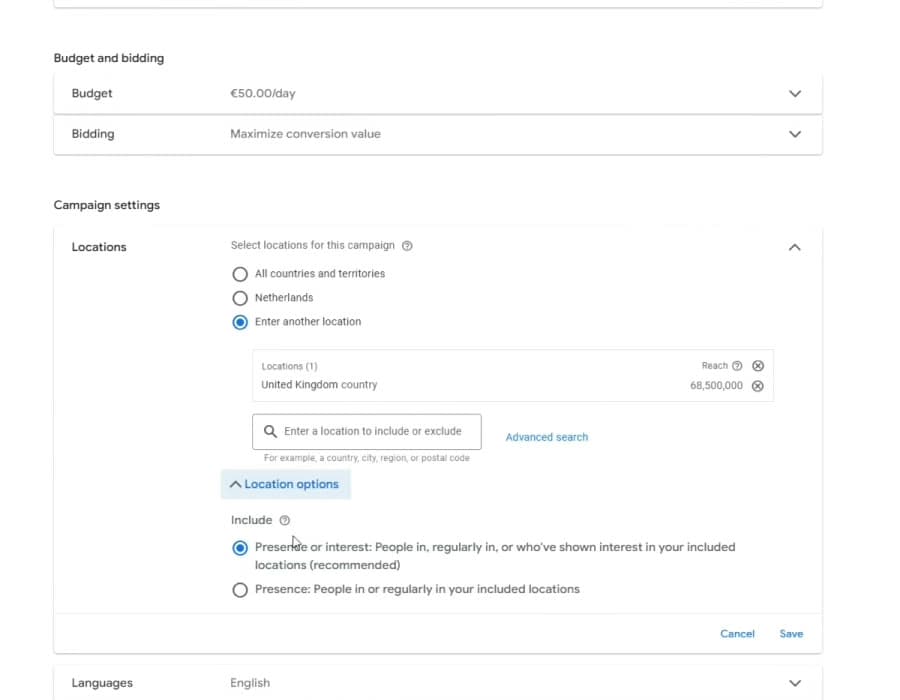
- 1Only the countries you ship to. This store sold to the United Kingdom.
- 2Open Location options.
- 3Presence or interest. Google marks it recommended. Do not keep it.
- 4Presence. Pick this one, then click Save.
Step 6: Test the Tag with a Real Order
Your own test order will not show up as a Google Ads sale. Google Ads only counts sales that come after someone interacts with an ad, and you did not click one. So test the tag, not the report. In Goals, then Conversions, open Google's Tag Assistant and connect it to your store. Buy one product. Check that the purchase event fires with the right value and currency. Google says the status updates about 30 minutes later (Google's Tag Assistant steps). Then check that your products show as approved in Merchant Center. Only then launch.
Next level: server-side tracking. It sends each sale from a server straight to Google. Fewer sales get lost to ad blockers and privacy rules. How many you get back depends on your store. The full setup is in conversion tracking for dropshipping.
Before You Spend: Merchant Center, Negatives and Europe
The Merchant Center Checklist for Dropshippers
Google Merchant Center checks your store and products against its policies before your ads run. Its misrepresentation policy is the one to read first. It bans hiding where orders ship from, hiding shipping costs, and fake business details.
| Check | What Google looks for | How to pass |
|---|---|---|
| Shipping times and costs | A real delivery window and every shipping cost, shown up front | Show the honest estimate on every product page and in Merchant Center shipping settings |
| Where orders ship from | No hiding where the product comes from | Say on the shipping page where orders ship from and how long that takes |
| Return and refund policy | A clear policy people can find, and returns you really honor | A plain policy page in the footer, with the return window and who pays return shipping |
| Contact details | Your real business name and contact details | A working email or phone and a business address, on the site |
| Page matches feed | The same price, product and claims on the ad, the feed and the page | Sync price and stock from Shopify. Never edit one without the other |
| Sale prices | A "was" price that is real | Only show a compare-at price you really charged before |
| Product claims | Nothing you cannot back up | Cut big health, beauty or "best in the world" claims |
| Product identifiers | The real identifiers the product has: GTIN (the barcode number), brand, MPN (the maker's part number) | Send every one that exists. Set identifier_exists (the "no identifier" flag) to no only when the product has none, like custom-made goods (Google's rules). Never invent one |
| Checkout | A working checkout with clear total costs | Run a real test order before launch |
Don't dump the whole catalog on day one. Start with 20 to 50 researched products. That keeps every page easy to check by hand. Add more as Google approves them.
Work the full list with the Merchant Center disapproval checklist. Already suspended? Fix the gap, then ask for a review. See how to fix a Merchant Center suspension on a dropshipping store and how to fix a misrepresentation suspension.
Negative Keywords from Day One
A negative keyword blocks a search you do not want to pay for. Someone searching "free dog bed diy" is not buying your dog bed. Block those searches before the first click.
These four rarely block a buyer. Read them once against your products, then add them to your Search and Performance Max campaigns at launch (Google on PMax negatives):
tutorial
"how to make"
jobs
salary
A single word blocks every search that contains it. The quotes on "how to make" block only that phrase. So "how to choose a dog bed" still gets through.
These look like junk too. But they can block real buyers. Check each one against what you sell first.
| Word | Junk it blocks | Buyer it can block |
|---|---|---|
| free | "free dog bed pattern" | "dog bed free shipping", someone ready to buy |
| diy | "diy dog bed" | "diy candle kit", if you sell kits |
| cheap | "cheap dog bed diy" | Budget shoppers, if you sell the low-price version |
| review | "dog bed review youtube" | "best dog bed reviews", from someone close to buying |
| used, second hand | "used dog bed" | Nobody, if you only sell new. Then add it |
| amazon, ebay, aliexpress, temu | "dog bed amazon" | People comparing prices before they buy |
| pattern | "dog bed sewing pattern" | "floral pattern dress", if you sell clothes |
| manual | "dog bed manual" | "manual coffee grinder", if you sell kitchen tools |
| repair | "dog bed repair" | "tire repair kit", if you sell car parts |
Then open the search terms report once a week, for Search and for Performance Max. That report lists the searches your ads showed on. Add every junk search as a negative. Ten minutes a week. The report leaves out some rare searches, so it will never be complete. Full method: negative keywords for Google Ads dropshipping.
Two Europe Costs to Know
The CSS choice. In most of Europe, Shopping ads run through a Comparison Shopping Service (CSS). A CSS is a company that places Shopping ads for you. If you never picked one, you are on Google's own CSS, called Google Shopping. Google takes a fixed share of each bid as its margin before the bid enters the auction. It does not publish the number (Google's CSS page). An outside CSS partner can charge less, so the same budget can bid harder. Get their exact fee in writing before you switch. Google lists the partners on its CSS partner site.
The EU import charges. Since July 1, 2026, the EU charges a 3 euro customs duty per item on parcels from outside the EU. It covers parcels worth up to 150 euro. In practice the EU counts one "item" per line on the customs form. Each type of product gets its own line. Two toys and a coat in one parcel is two lines, so 6 euro. A new handling fee of 2 euro per item comes on top. The Commission fixed the fee at 2 euro in an act that is still under review. Its guidance expects the fee from November 1, 2026. The fee also covers online sales above 150 euro (European Commission guidance). So that two-line parcel pays 6 euro of duty plus 4 euro of fees. Import VAT still applies on top. Add both charges to your product cost and redo your break-even ROAS.
Budget and Break-Even ROAS
You need two numbers before you judge a campaign: your break-even ROAS and your max cost per sale.
| Margin before ads | Break-even ROAS |
|---|---|
| 15% | 6.7 |
| 20% | 5.0 |
| 25% | 4.0 |
| 30% | 3.3 |
| 40% | 2.5 |
| 50% | 2.0 |
Pure math, not our data. Thinner margin, higher ROAS needed.
Work Out Your Own Number
Take one $50 product. Swap in your own numbers.
| Line | Example | Where to find your number |
|---|---|---|
| Selling price, before VAT or sales tax | $50.00 | Your product page price, minus tax |
| Product cost from your supplier | -$20.00 | Your supplier's price for one unit |
| Shipping you pay | -$6.00 | Your supplier's shipping price to your main country |
| Payment and app fees | -$2.00 | Your Shopify payment fee plus apps you pay per order |
| Refunds and returns (example: 5% of price) | -$2.50 | Last 90 days of refunds divided by sales, times the price |
| Margin before ads | $19.50 | Price minus product, shipping, fees and refunds |
| Margin before ads, as a share of price | 39% | Margin divided by price |
| Break-even ROAS (1 / 0.39) | 2.56 | 1 divided by that share |
| Max cost per sale (margin before ads) | $19.50 | Same as your margin before ads |
So ads on this product stop losing money above a 2.56 ROAS, or under $19.50 per sale. That is break-even. Not profit. Your fixed costs, like apps, staff and your own time, still come out of what is left. Run your own numbers in the dropshipping profit checker, then get your target from the Google Ads ROAS calculator.
Each product has its own margin, so each has its own break-even. One target for the whole account hides the products that lose money.
How Big a Launch Budget You Need
Plan on about $60 a day, or about $1,800 for the first month, for a product around $50.
ZenoX rule of thumb: wait for about 30 sales in the last 30 days in a campaign before you set its target ROAS. Fewer than that and one lucky day swings the numbers. Even 30 to 50 sales can be thin when they spread over many products. I show why in the course.
The share of clicks that end in a sale is your conversion rate. So 2% means 2 sales per 100 clicks. Divide 30 sales by it to get the clicks you need. Multiply by your cost per click (CPC) to get your spend.
| Product price | Conversion rate | Clicks for 30 sales | At a CPC of | Spend for 30 sales | Days at $50 a day |
|---|---|---|---|---|---|
| $30 | 2% | 1,500 | $0.50 | $750 | 15 |
| $50 | 2% | 1,500 | $1.00 | $1,500 | 30 |
| $150 | 1.5% | 2,000 | $1.50 | $3,000 | 60 |
| $500 | 1% | 3,000 | $2.50 | $7,500 | 150 |
Example inputs, not benchmarks. Read your own CPC after a few days and redo the sum.
Take a $50 product at $1 a click and a 2% conversion rate. $50 a day on Performance Max buys about 50 clicks and about 1 sale a day. After 14 days that is about 14 sales. That is enough to see a trend, not enough to set a target. Thirty sales in the last 30 days takes about 30 days and $1,500.
Add about $10 a day for brand Search and you get the $60 a day, about $1,800 for the month. Only spend money you can lose and still be fine. Pick your loss limit before day one. At $10 a day the same 30 sales take about 150 days. Tiny budgets tell you nothing.
A surprise charge from Google is usually your payment threshold. Google bills you on the first day of the month, or sooner when your costs hit the threshold. The threshold rises each time you hit it (Google on payment settings).
Want the spend split by campaign? It is in the dropshipping Google Ads budget guide.
The Launch Plan: From Day 0 to Scale
We launch two campaigns on a new store. One feed-only Performance Max at $50 a day. One brand Search campaign at about $10 a day. Worked example: a US store selling a $50 dog bed, at $1 a click and a 2% conversion rate. Swap in your country, store name and budget.
Maximize Conversion Value means Google bids to get the most sales value it can for your budget. An asset group is the box inside a Performance Max campaign that holds your products and any headlines, images or videos. Final URL expansion lets Google send clicks to other pages on your site. We turn it off, so every click lands on the product it was for.
| Setting | Campaign 1: Performance Max | Campaign 2: brand Search |
|---|---|---|
| Name | US | PMAX | All Products | FeedOnly | US | Search | Brand |
| Daily budget | $50 | About $10 |
| Products or keywords | Your approved feed products, in one asset group | One keyword: your store name in exact match (the ad shows only on that search or a close variant), written in square brackets, like [your store name] |
| Ads | None. Leave the asset group empty, so it runs from the feed only | One ad that Google builds by mixing 15 headlines and 4 descriptions you write about your store (a responsive search ad) |
| Bid strategy | Maximize Conversion Value, no target ROAS | Manual CPC with a low max bid. We use 0.50 in the store's currency |
| Locations | Only countries you ship to. Presence only | Same |
| Asset automation | Off: text, final URL expansion, image enhancement, image extraction, video enhancement | Off: text and final URL expansion |
| Brand exclusion | On. A brand list with your store name. Keep "Allow Shopping ads on searches that mention excluded brands" ticked | Not needed. This campaign is only your brand |
| Conversion goal | Campaign-specific: Purchases | Same |
| Negatives | The four starter negatives: tutorial, "how to make", jobs, salary | Same, plus anything that is not your store |
My full PMax build in the course starts at 1:12:20, and brand Search at 1:31:35.
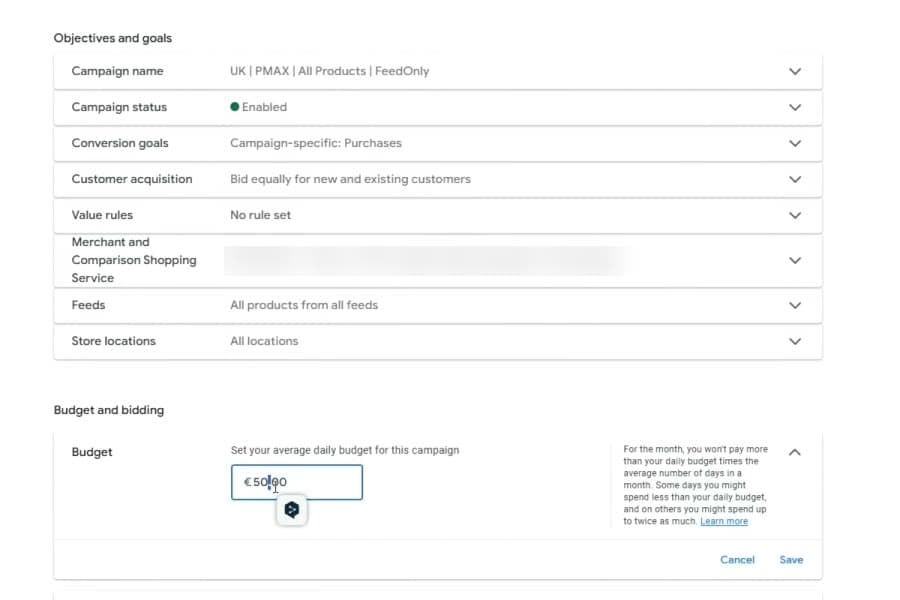
- 1Name it so you know what it is at a glance: country, type, products, feed-only.
- 2Conversion goals: Campaign-specific, Purchases. Nothing else steers the bids.
- 3Daily budget. Some days Google spends up to twice this. Over the month it stays within the daily budget times the average days in a month.
Brand Exclusion: Keep Your Own Name Out of PMax
Once people search your store name, PMax will happily take those cheap clicks. Then its ROAS looks better than it is, because those buyers already knew you. So we exclude our own brand from PMax and let the brand Search campaign take those searches. Our cold-launch case lists "a Search backstop with brand exclusions" for the same reason. Read its 3.6x ROAS with that split in mind.
How to add it to a live PMax: Campaigns, then the Settings tab. Pick the campaign, open Additional settings, then Brand exclusions. Pick a brand list with your store name and click Save. Leave "Allow Shopping ads on searches that mention excluded brands" ticked. That way your products still show in the Shopping row when someone searches your name (Google's brand exclusion steps). The exclusion covers Search, Shopping and YouTube search inventory only.
Feed-Only Has One Gap: Video
Turning off video enhancement does not stop video. That setting only lets Google edit videos you uploaded. With no video in the asset group, Google says it may make one. For Merchant Center campaigns it can build that video from your feed's text and images (Google on PMax video).
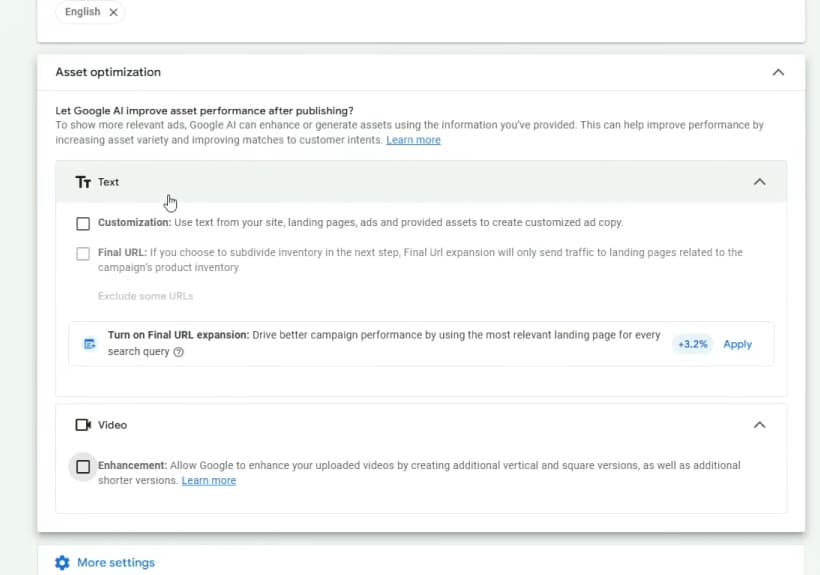
- 1Text customization. Off.
- 2Final URL expansion. Off.
- 3Video enhancement. Off. Read the label: it only edits videos you uploaded. It does not stop Google making its own.
So check where the money goes, once a week:
- Channel report. Campaigns, then Insights and reports, then Channel performance. It splits spend across Search, YouTube, Display, Discover, Maps, Gmail and Search partners. It also splits ads using product data from ads using video (Google's channel report).
- Asset report. It lists every asset the campaign uses. A video you never uploaded is one Google made.
- Decide. Video spend that brings sales is fine. Video spend with no sales? Upload a video you made yourself, or move those products to Standard Shopping, which shows only Shopping ads.
The Stages
| Stage | Budget | What you do | Move on when |
|---|---|---|---|
| 0. Get ready | $0 | The six Shopify setup steps. A first batch of 20 to 50 approved products | Tag Assistant shows the test purchase with the right value. Products are approved |
| 1. Learn (days 1-14) | About $60 a day | Run the feed-only PMax and brand Search campaigns. Add negatives once a week | Day 14. About 14 Performance Max sales in the $50 dog bed example |
| 2. Read (day 15 to about 30 sales) | Same | Exclude products that spent 2-3 times their max cost per sale with no sale | About 30 sales in the last 30 days. Around day 30 in the $50 dog bed example |
| 3. Split | Same total, shared by tier | Move a margin tier into its own campaign. Set its target from its real ROAS (how) | The new campaign beats its break-even ROAS two weeks in a row |
| 4. Scale | Early: a bigger jump, like $50 to $80, is fine. Later: up 10-20% at a time | More budget for winners. Fix or cut losers | Wait 3 to 4 days at least, a week is better. ROAS holds? Step again. Below break-even? Step back |
Stage 1 buys data, not profit. Judge profit only from stage 2 on.
Each campaign learns from its own sales. Split a tier out only if it can still get about 30 sales a month on its own. Too small? Leave it in the main campaign for now.
How to Set the First Target ROAS
A target ROAS is the ROAS you tell Google to aim for when it bids. Set the first one from the last 30 days, not the whole history. Skip the last 3 days, because sales can land in Google Ads days after the click. Then:
- Real ROAS above break-even? Set the target a bit under that real ROAS, never under break-even. Say it made 2.8x and break-even is 2.56. Set about 2.6. A target too close to what it already gets chokes spend. I walk through this at 3:00:48.
- Real ROAS below break-even? Do not set a target to force it. A target cannot fix a weak product, price or page. Fix those first, or cut the product.
- Growing fast and happy with the ROAS? You do not have to set a target at all.
When to Break the 14-Day Rule
Leave budgets and settings alone for 14 days. Big changes can put the bid strategy back into "Learning". Its listed reasons include a new strategy, a changed setting, and adding or removing campaigns (Google's bid strategy statuses). But act the same day if:
- Tracking breaks. No sales recorded while Shopify shows orders. Fix it first.
- Products get disapproved. Fix them in Merchant Center right away.
- A product sells out. Pause it in the feed.
- You hit your loss limit. Pick it before day 1, for example about $1,800, the first month at $60 a day. Hit it with only a few sales and you stop. Fix the product, price or page before you spend more.
When Spend Goes up but Sales Do Not
Do not raise the budget. Check these, in this order:
- Tracking. Run the Tag Assistant test again. Does the purchase fire with the right value?
- Search terms. Is the money going to junk searches? Add negatives.
- Price. Search your product. Are you more expensive than the Shopping row next to you?
- Product page. Does it load fast on a phone? Does checkout work?
All four pass and still no sales? Then it is the product or the offer. Test a better price or a different product before you spend more.
Your Weekly 20 Minutes
- Open the search terms report. Add every junk search as a negative.
- Open Merchant Center diagnostics (the product issues page). Fix any disapproval the day you see it.
- Compare each campaign's ROAS with its break-even ROAS. Above it, leave it alone. Below it, dig in.
- Do not touch bids or budgets every day.
Not at your first $1K day yet? Start with Google Ads for dropshipping: the four principles behind a first $1K day, then come back here to scale. The click-by-click setup is also in how to start dropshipping with Google Ads.
Account Structure When You Scale
A big leak: one Performance Max with every product in it. Smart Bidding takes the easy path. It spends on cheap products that sell easily and starves the ones that make you money.
Split by margin tier with custom labels (tags you add to each product in the feed). Asset groups do not fix this. All asset groups in a campaign share one budget and one target ROAS. So they cannot give high-margin and low-margin products different targets.
When two tiers need different targets, give each tier its own campaign. Champions (high margin, proven) go in one campaign with a lower target ROAS, so Google can bid harder on them. Thin-margin products go in another with a higher target. Use asset groups only to sort products that share the same target.
Scaling is a staircase. At $50 a day you can jump harder, like to $80, if a bad day will not scare you. Once spend is big, raise the budget 10 to 20 percent. Wait at least 3 to 4 days, a week is better. If ROAS held, step again. If it slipped, hold. That is the rule from my course chapter on scaling, at 3:17:39. ROAS often drops as spend grows, because you reach colder buyers. Plan for profit in dollars, not for one ROAS number.
Every bid strategy, from Maximize Conversions to portfolio bidding: Google Ads bidding strategies for dropshipping.
The Feed: What 12,375 Sampled Products Show
Shopping and Performance Max have no keywords. Google reads your product titles and attributes (the fields in your feed) to decide which searches you match. So your feed does the job keywords do in Search. A lazy feed loses.
We sampled 12,375 products from 251 store feeds connected to our Merchant Center account, on July 28, 2026. That is up to 50 products per store. Many were measured at onboarding, before our work started. So this is how feeds arrive, not how they leave.
SAMPLED PRODUCTS WITH A GTIN OR MPN
- No GTIN and no MPN81.3%
- Has a GTIN or an MPN18.7%
| Feed field | Share of sampled products that fill it |
|---|---|
| Brand | 97.5% |
| Condition | 96.2% |
| Color | 84.9% |
| Product type | 80.8% |
| Size | 80.1% |
| 2+ extra images | 41% |
| GTIN or MPN | 18.7% |
| Product detail | 10.8% |
| Material or pattern | 5% |
168 of 251 stores had no identifier on any sampled product. Google's rules say to send every identifier a product really has. Only 5% fill material or pattern, and only 10.8% fill product detail.
The fields apps fill on their own, like brand and condition, sit near 100 percent. So they set nobody apart. The fields you fill by hand are where you win. Every number is in the Product Feed Quality Index.
Titles Are Your Keywords
68% of sampled titles run past 80 characters. Many come straight from the supplier, stuffed with words like "Hot Sale 2026 New Fashion". Google allows up to 150 characters (Google's product data rules).
Write them the way people search: product type, key feature, material or use, then color and size. Use only facts you checked on the supplier's spec sheet or the product itself. Writing "leather" on a faux leather bag is a false claim, and Google's policy bans false claims.
FEED TITLE REWRITE (EXAMPLE)
Supplier title
Junk
Hot Sale Women Bag 2026 New Fashion Shoulder Handbag Trend
Rewritten
Clean
Women's Faux Leather Shoulder Bag, Zip Closure, Black, 30 x 22 cm
Use Google's Keyword Planner to pick which words go first. Cut hype words like "Hot Sale" and "2026 New". Never cut a true detail a buyer needs, like size, color or material, just because it shows low search volume.
Custom Labels: How You Split the Budget
Custom labels tag each product with facts Google does not know: margin tier, best seller, season. Then you build campaigns around those tags.
Margin is the big one. Sales pile up on a few products. In our ecom Pareto study, the top 1% of 95,149 fashion products took 45.2% of Google Ads revenue. In home decor (11,251 products), the top 1% took 37.7%. When so few products carry the revenue, you want to control which ones get the budget. Tags make that possible.
Step by step: the Google Shopping feed optimization guide.
The Six Things That Decide Whether a Store Scales
Most stores stuck under $1K a day blame the wrong thing. Bids. The media buyer. PMax versus Shopping. Six things decide scale, in a fixed order. Most people jump to four and five before one, two and three are done.
| Step | Lesson | What it means | Watch it |
|---|---|---|---|
| 1 | It is a numbers game | Test products and markets on a plan. Decide what a good cost per click, order value and conversion rate look like before you spend | 1:04 |
| 2 | The offer comes first | Google is a price comparison platform. No media buying fixes a weak offer | 3:17 |
| 3 | Break the feed into four labels | Champions, potentials, sleepers and wasters. Cut wasters, push champions | 5:05 |
| 4 | Tune the details later | Order value, conversion rate, cost per click, page speed and email flows. Only once the first three hold | 11:11 |
| 5 | Structure and media buying | Stop running one PMax with every product inside. Build campaigns around the four labels | 13:56 |
| 6 | Scaling is a flywheel | A 10K day can fall back to a 2K day. Find the next bottleneck and go again | 17:38 |
Google puts your price right next to your rivals. Weak offer, no scale. Simple.
The feed split matters most. More wasters than winners caps you, even when the winners look great. Two champions carrying the whole store is a risk too. One rival who undercuts you can halve your demand.
On the details: do not over-tune at $50 or $100 a day. You lack the data. At $1K or $2K a day, one day brings more data than a small budget gets in two weeks. The full transcript and all 24 chapters are on the six steps video page.
Proof from Real Dropshipping Accounts
Our results page has three dropshipping cases. Cases 1 and 3 are one store each. Case 2 adds up several stores run by one operator. Each case page says the numbers come from the client's own Google Ads account. The exports are not public, and no outside checker verified them. None of this is a promise.
Case 1: €0 to €100K a Month in 60 Days
A fashion dropshipping store in the EU, cold launch. No account history and no tracking data from earlier ads.
Revenue per month
€100K
Ad spend per month
€28K
ROAS
3.6x
Days
60
What we did: server-side tracking and Merchant Center first. We cleaned the feed while Google was still reviewing the ads. Then we split the products by margin tier and added a brand Search campaign. Read the full case study.
Case 2: €10-15K a Day Across Several Stores in the Holiday Season
An 8-figure fashion dropshipping operator with several stores on one playbook. Every number is all the stores added up. Over 120 days, monthly spend went from €60K to €140K. Monthly revenue went from €220K to €420K. ROAS came down from 3.7x to 3.0x. The case page calls that a planned trade. Buy more sales at a lower ROAS while holiday demand lasts, October to December. Read the full case study.
Case 3: 4 in 10 Products Could Not Show in Shopping
A 6-figure fashion dropshipping store came in with 40% of its feed disapproved. Those products could not show in Shopping at all. We cleared the disapprovals in the first week. Performance lifted before we touched a campaign setting. Over 180 days, monthly spend went from €4K to €22K. Revenue went from €12K to €88K. ROAS went from 3.0x to 4.0x. Read the full case study.
Case 3 is the one most people miss. In that account the feed was the problem, not the bids. Count your disapprovals before you blame the campaign. More accounts are on our results page.
What Reddit Gets Right and Wrong
These six Reddit threads show up on Google when people search Reddit for Google Ads dropshipping questions. One of them, the $170 thread, ranked #3 for "google ads dropshipping" itself. That comes from our rank check in DataForSEO (a search data tool), US results, October 7, 2026. Good questions. Half-right answers.
| The thread, in short | What it gets right | What it misses |
|---|---|---|
| Just started, $170 spent, 137 visits, no sales | Stopping to ask before spending more | At a 2% conversion rate, 137 visits should bring about 3 sales. Zero is a warning, not proof. Check tracking and the product page first |
| Over $100 on Performance Max, not one sale | That can be normal | $100 is two days at $50. At $1 a click and 2% conversion you would expect about 2 sales. Run the tracking test, then judge at day 14 |
| How Google stores are hitting $100k days within 2 weeks | Big Google days are real. Our multi-store case ran €10-15K a day across several stores in the October to December holiday season | It is not a plan. Our published cold-launch case reached €100K a month, not a day, and it took 60 days |
| Has any dropshipper managed to get Merchant Center approved? | Misrepresentation flags are a real wall for new stores | Google publishes the rules. Work the Merchant Center checklist, then ask for a review |
| Do any of you dropship with Google Search ads only? | Search catches buyers and guards your brand | Shopping ads show a photo and a price. Search alone leaves that row to your rivals |
| Is the Google Shopping general store good for a beginner? | It can work, because buyers search product names, not your brand | A messy general store invites Merchant Center trouble. Start with 20 to 50 products and clean policy pages |
Our longer takes are in Google Ads dropshipping on Reddit and is Google Shopping worth it for dropshipping.
The Five Mistakes That Burn a New Account
Each one costs real money. None shows up as an error.
- Judging too early. You turn the campaign off on day five because it lost money. Five days at $50 a day, $1 a click and a 2% conversion rate is about 5 sales. That tells you almost nothing yet.
- One target for every product. Your winners starve. Give each margin tier its own campaign once it has the sales to learn.
- A dirty feed. Supplier titles, missing identifiers, disapprovals. Fix the feed before the bids.
- Broken tracking. Smart Bidding learns from wrong data. Test the tag with Tag Assistant and a real order.
- Scaling a loser. More budget on a campaign below break-even just loses money faster.
Each one in depth: why Google Ads dropshipping fails.
Google Ads vs Meta Ads for Dropshipping
Google Search and Shopping catch demand that already exists. Meta creates new demand.
| Google Ads | Meta Ads | |
|---|---|---|
| What it does | Search and Shopping catch existing demand | Creates new demand |
| Buyer mindset | Already searching to buy | Scrolling, not shopping |
| Best for | Products people search for | New, impulse, visual products |
| Main workload | Feed and structure | Constant new video |
If your product has search demand, start with Google. If it is brand new and sells on impulse, start with Meta. Then add Google to catch the searches Meta creates. Plenty of stores end up running both. Head to head: Google Ads vs Facebook ads for dropshipping.
Learn It Free or Hire It Out
You can run all of this yourself. Most stores should start that way.
Learn It Free
Prefer video? Watch my free four-hour course. Want short lessons instead? Take the free Google Ads dropshipping course, cut into 10 lessons. The room itself is our Google Ads Skool community, and the Google Ads dropshipping hub lists every post we wrote on this. Want software help on your own account while you learn? Our sister company Scaley AI built AI tools for Google Ads dropshipping that read your account and tell you what to change.
Free playbooks
The Dropshipping Playbook Shelf
Feed work, pricing, Merchant Center and scaling. The same step-by-step guides our team runs on client stores. Free on Notion, no email gate.
- Google AdsGoogle Ads Masterclass for Dropshippers and Ecom BrandsThe full walkthrough. How we run Google Ads for ecom stores, start to finish, in one place.
- FeedsFeed Optimization MasteryThe deep version. Every feed attribute that moves clicks and sales, one by one.
- FeedsGoogle Shopping Feed OptimizationHow to write product titles that match what people search, so your ads show more.
- FeedsCompetitive Price MonitoringPrice is a ranking signal in Shopping. How to watch rivals and stay competitive.
- PricingPricing MasteryGoogle Shopping is a price comparison engine. Find the price that converts at the highest margin without killing your click rate (the share of people who see the ad and click).
- PricingThe Perfect Offer FrameworkYour offer is the product, the price and the extras together. Build the one people pick over the next store.
- ScalingEU Import Fee 2026 PlaybookThe new EU fee explained simply, and the moves that protect your profit without repricing everything.
- Merchant CenterBenefits of Switching Your CSS PartnerA CSS switch can cut your Shopping costs. What it is and why it helps.
- ScalingGoogle Shopping Profit OptimizationsShopping accounts leak profit in a hundred small places - wrong products getting budget, bad signals. Plug the leaks.
- ScalingDropshipping Scaling PrinciplesThe rules for scaling a dropshipping store on Google Ads without the wheels coming off.
Hire It Out
Hand it off when the account makes money and your time becomes the limit. The signs:
- You spend 20+ hours a week on the account and still fall behind.
- ROAS has been flat for 30 days and you cannot find the leak.
- Merchant Center disapprovals stack up faster than you can fix them.
That is what our Google Ads dropshipping agency does every day. Yes, that is us. Weigh it that way. ZenoX is one of the largest Google Ads agencies for ecom and dropshipping. We take stores that spend at least €10K a month on ads. Below that, learn it free in the eCom Lab. The fee is tiered on spend: 10% on the first €10K a month, stepping down to 6% above €150K. The full ladder is on the pricing page. Comparing agencies first? Here is the best Google Ads agency for dropshipping list, with each one's published fees and terms.
Who should not hire us:
- Products nobody searches for. We build on Search and Shopping, and they cannot catch demand that does not exist. Start on Meta.
- Margins that cannot clear break-even. No agency fixes a product that loses money at every realistic ROAS. Fix the offer first.
- Anyone who wants a guaranteed ROAS. Nobody honest can promise one.
Still a fit? Chat With Us on WhatsApp.
Frequently Asked Questions
Is Google Ads Good for Dropshipping?
Yes, when people already search for what you sell. Google Search and Shopping show your product to someone who typed it in, so the buyer is warm. They work badly for new impulse products nobody searches for yet. Those need Meta first. Clean Merchant Center, working tracking and a margin above break-even decide the rest.
Is Dropshipping Allowed on Google Ads and Google Shopping?
Yes. Google does not ban a store because a supplier ships the order. Its misrepresentation policy bans hiding things from buyers. That includes hiding where orders ship from, hiding shipping costs, and giving a fake business name or contact details. Be open about all of it and dropshipping is fine on Google Shopping and Performance Max.
Is $20 a Day Good for Google Ads?
For a brand Search campaign, yes. For launching Performance Max on a typical dropshipping store, it is thin. Say you pay $1 a click, and 2 of every 100 clicks end in a sale (a 2% conversion rate). Then $20 a day brings about one sale every two and a half days. Our rule of thumb is about 30 sales in the last 30 days before you set a target. At $20 a day you get about 12. Our example launch is $50 a day on Performance Max plus about $10 a day on brand Search. Pick a loss limit before day one, whatever you spend.
Is $10 a Day Enough for Google Ads?
Not for testing a dropshipping product. At $1 a click, $10 a day buys 10 clicks. At a 2% conversion rate, that is about one sale every five days, so about 6 sales a month. Our rule of thumb is about 30 sales in the last 30 days before you set a target. At $10 a day you never get there.
Why Did Google Ads Charge Me $500?
Most likely you hit your payment threshold. On postpay, Google's new name for automatic payments, Google charges you on the first day of each month. It also charges you sooner if your costs reach your threshold. Each time you hit the threshold, it goes up. In Google's own example it climbs from $50 to $200, then $350, then $500. Open Billing in Google Ads to see your threshold and what each charge covered. Source: Google Ads Help, "About payment settings in Google Ads".
How Quickly Do Google Ads Work for a New Store?
Give it 14 days before you judge anything. Our rule of thumb: wait for about 30 sales in the last 30 days before you set a target ROAS. At $50 a day, $1 a click and a 2% conversion rate, that is about a month. Two things stop the clock early. Fix broken tracking or disapprovals right away. And if you hit the loss limit you set before launch, stop and fix the product, price or page.
What Is a Good ROAS for Dropshipping?
Any ROAS above your own break-even. ROAS is sales divided by ad spend. Break-even ROAS is 1 divided by your margin before ads (price minus product, shipping, fees and refunds). On a 25% margin, break-even is 4.0, so 3x loses money. On a 40% margin, break-even is 2.5, so 3x makes money. There is no single good number.
Is Performance Max Worth It for Dropshipping?
Yes, as the first campaign for most stores, run feed-only. It is simple and it reaches Shopping and other Google spots. We see it find first buyers faster than hand bids on a new account. The catch is control. Put margin tiers in separate campaigns with their own targets, and add Standard Shopping once you know your winners.
Are Google Ads Still Worth It in 2026?
Yes, for stores with real search demand. Shopping ads still show on product searches. Google's AI Mode shopping also draws on its Shopping Graph, and Merchant Center feeds are one source for that graph. Google does not say how it picks products for AI answers, so a clean feed is no promise. Stores still lose for the same old reasons: thin margins, broken tracking or a lazy feed.
What Are the Downsides of Using Google Ads for Dropshipping?
Four. Clicks cost money from day one, and the first weeks are mostly learning. Merchant Center checks your store against strict policies, and a store that breaks them can get suspended. Performance Max shows less detail than Standard Shopping, even with its search terms report. And Search and Shopping only catch demand that exists. If nobody searches for your product, a Search and Shopping launch will not sell it.
Should I Start with Google Ads or Meta Ads for Dropshipping?
Start with Google when people already search for your product. Start with Meta when they do not, because Meta creates demand and Google Search and Shopping catch it. For products with search demand, Google needs less new creative. Plenty of stores end up running both.
Can You Make $10,000 a Month Dropshipping with Google Ads?
In sales, yes. Our own cold-launch case reached EUR 100K a month in revenue in 60 days, on EUR 28K of ad spend. That is one store, not a promise. Sales are not profit. On a 39% margin before ads, $10,000 in sales leaves $3,900 to pay for ads and everything else. Profit is what is left after that.