Scaling Playbook11 min read

Google Ads Dropshipping Course 2026: The System Breakdown

Chris breaks down his full free 4-hour Google Ads dropshipping system - from account setup to your first live campaign. Here is what the course covers.

Most people jump straight to the campaigns. That is exactly why they waste money.

Chris built this 4-hour free course to fix that. It covers the full system - from zero to your first live campaign - the same way ZenoX Media runs it across more than 140 dropshipping stores. This post breaks down what the course teaches in the opening modules, so you know what you are getting into before you hit play.

Why the setup phase matters more than the ads

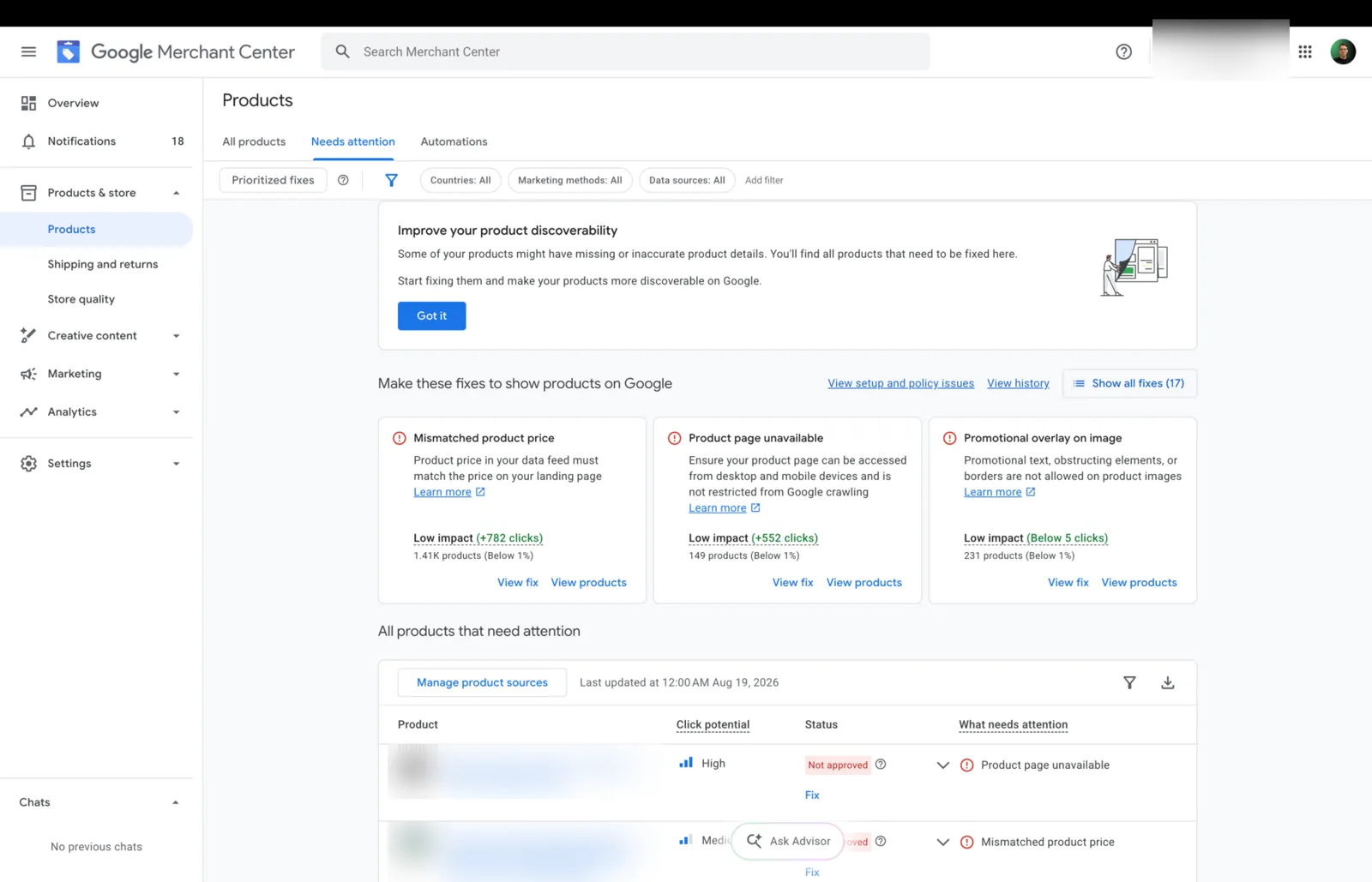
The course starts here and it is not an accident. Before a single ad goes live, you need five accounts properly linked: Google Ads, Google Merchant Center, Google Tag Manager, Google Analytics 4, and TrackB. Miss one or rush any of them and you are building on a broken foundation.

Chris walks through each one step by step using a real store called Kada - a UK-based shoe brand - so you are not just watching theory. You are watching it get built live.

One thing worth noting early in the course: when you create your Google Ads account, Google will try to push you straight into campaign creation. Skip it. Set up billing and then complete the advertiser verification - upload your company document and get verified before anything else. It saves problems down the line.

The tracking standard that changes everything

This is probably the most important module in the early part of the course. Chris says it plainly: without proper conversion tracking, there is no point running ads.

A lot of beginners track around 30 to 40% of their conversions. They see purchases in the Shopify backend and think that is fine. It is not. Here is why it matters so much - especially early on.

Google's algorithm learns from data. The more quality conversion data you feed it, the faster it exits the learning phase and the better it performs. Poor tracking means the algorithm is working with half the picture. You get slower learning, inconsistent results, and confusing data where the ad account and Shopify show completely different numbers.

The course recommends TrackB for conversion tracking. Chris uses it in 99% of client accounts and says you can realistically hit 90 to 95% tracking quality. That is the target. TrackB is free up to €50k in store revenue and around €100 per month after that. He is direct about this: do not use a cheap free tracking setup to save €100 a month when it will cost you far more in wasted ad spend.

Without proper conversion tracking there is no need to even get started with ads. A lot of people underestimate that.

Christopher Krassnig

The course covers the full TrackB setup: connecting your Shopify store, linking your Google Ads account, setting up the conversion booster, and configuring the custom pixel. One critical setting that trips people up - only purchase should be set to primary. Page views, add to cart, and begin checkout go to secondary. If you track everything as a primary conversion, the algorithm optimizes for all of it. You want it optimizing for revenue only.

Chris also covers attribution models here. The course recommends switching from last click to data-driven attribution. Last click gives 100% of the credit to the final ad someone clicked before buying - which misses everything that influenced the decision along the way. Data-driven is more realistic and more accurate once you have enough data in the account.

The product data feed is your targeting

With search ads or Facebook ads you set keywords or audiences. With Performance Max shopping ads, you do neither. The product data feed does that job for you.

Chris makes this point clearly in the course: the feed defines the quality of your targeting. A well-built feed means Google can match your products to the right searches. A poor feed means you show up for the wrong searches, waste budget, and wonder why nothing converts.

The course uses Simrosys to build the feed for the Kada store. A few settings Chris flags as important:

  • Enable all variants - this is off by default for no good reason, turn it on
  • Set the correct product category for your store (for Kada, that is shoes, not general clothing)
  • Enable the sale price comparison feature - if you have a sale on and this is not enabled, Google just shows the sale price as the regular price and you lose the sale badge entirely

The sale badge matters. In the course, Chris shows a live example of a pullover ad with a visible sale badge, previous price, and current price. It stands out. It attracts clicks. Not having it enabled when you are running a sale is, as he puts it, pointless.

He is also clear that at the agency, the feed is something they keep optimizing over time - not just at setup. You start with a good base and improve it as you go. The feed you launch with is not the feed you scale with.

Feed-only Performance Max: why you force shopping

This is the campaign strategy the whole course is built around. Chris runs Performance Max for every client, but not the way Google sets it up by default.

The default Performance Max campaign spreads your budget across every Google property - search, display, YouTube, Gmail, Discover, and shopping. That is fine for big brands with big budgets. For a dropshipping store starting out, it is a fast way to burn money on placements that do not convert.

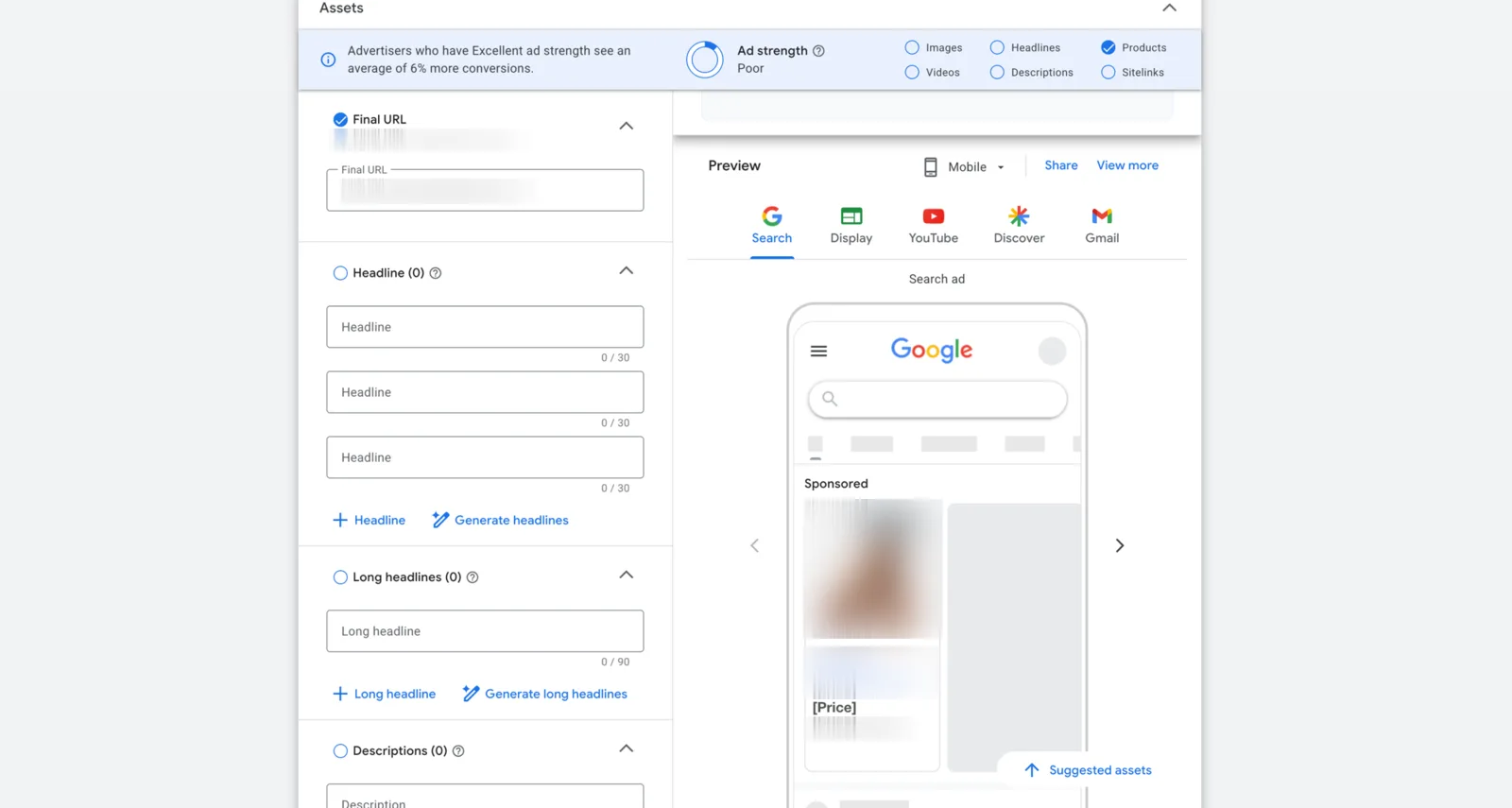
The course teaches a specific tweak: a feed-only Performance Max campaign. You disable text asset generation. You disable video. You add no headlines, no descriptions, no images. You skip the asset generation step entirely. This forces Google to only run your ads as shopping ads.

Why shopping? Because the intent match is better and the conversion probability is higher. Chris walks through a live demo in the course - searching for a product with clear buying intent and seeing exactly how shopping ads give buyers the information they need before they even click: price, brand, product image, sale badge, and sometimes even size. By the time someone clicks, they have already decided they are interested. That is why the conversion rate is higher and the cost per click is often lower than search ads.

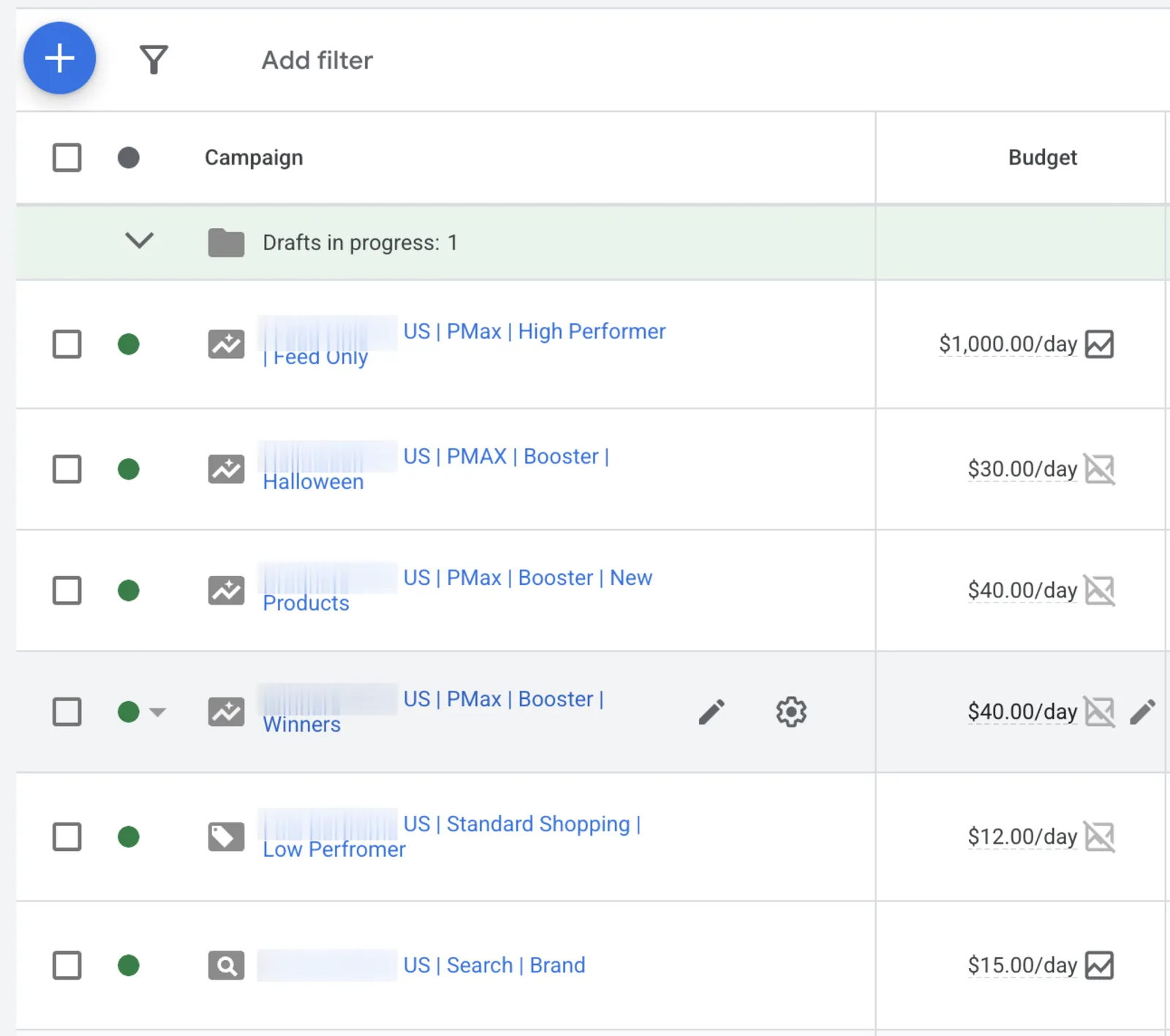
The campaign naming convention in the course is also worth noting: [country] - BMX/Feed Only - [store name]. Small thing, big payoff when you are managing multiple campaigns.

For bidding, the course is clear - do not set a target ROAS at the start. You have no data yet, and setting a target too early limits the algorithm before it has learned anything. Optimize for conversion value and let it run. The when and why of target ROAS is covered in a later module.

Brand search ads: cheap protection, real lift

The second campaign type in the course is brand search. Chris is upfront that this is not where you win - shopping is the main driver. But brand search earns its place.

Once you have spent real money on ads and built some brand recognition, people will search for you by name. Maybe they clicked your ad, got distracted, and came back looking for you later. A brand search campaign makes sure you show up when that happens - and that competitors do not steal that click.

The course touches on a study point: when you show up with both a brand search ad and an organic search result, conversion rate is higher than organic alone. And brand search clicks are, as Chris puts it, dirt cheap. You are bidding on your own brand name.

There is also a practical benefit - you can put an offer or seasonal message in the headline, use sitelinks to send people directly to the right category, and generally control what people see when they find you. The course shows a Nike example to illustrate how dominant brand presence in search results looks when it is done right.

The course is clear on timing: set it up now even if nobody is searching for your brand yet. It will not spend when there is no search volume. But when the brand starts to grow and people start looking, you want it in place.

For more on how to build the broader Google Ads structure for an ecom store, the Google Ads course for ecommerce 2026 goes deep on the full system. And if you want to understand what separates stores that scale from those that stay stuck, read the dropshipping Google Ads 2026 playbook.

What the full course covers

The excerpt from the course covered here is just the foundation - accounts, tracking, feed, and the first campaign types. The full 4-hour course goes much further.

Course length

4h 23m

Views on YouTube

77,000+

Stores at ZenoX Media

140+

What the full free course covers

Later modules cover topics not in this excerpt - campaign scaling, target ROAS strategy, budget decisions, and what to do when results plateau. Chris mentions he gets the target ROAS question from almost every client and from people across social media, so he gives it a dedicated video later in the course. Check the scaling playbook for more on that side of the system once your foundation is solid.

The course is completely free on YouTube. Everything you need to follow along - account links, GTM templates, and resource docs - is linked below the video.

If you want to go deeper than the video - live Q&A, account reviews, and a community of people running the same system - that is what the Skool community is for. Free course, bonus content, weekly calls, and 740+ ecom operators who are running Google Ads every day.

Frequently asked questions

Why does conversion tracking matter so much before running ads?

Without proper conversion tracking there is no point running ads. A lot of beginners track around 30 to 40% of their conversions and think it is fine. It is not. Google's algorithm learns from data. Poor tracking means a slower exit from the learning phase, inconsistent results, and confusing differences between what the ad account shows and what Shopify shows. TrackB hits 90 to 95% tracking quality - that is the target.

How do you force a Performance Max campaign to show shopping ads only?

Disable text asset generation and disable video in the campaign setup. Do not add any headlines, descriptions, or images. Skip the asset generation step entirely. When you add assets, Performance Max starts showing your ads as search and YouTube ads. Keep it empty and it stays on shopping placements only.

Why do shopping ads get a higher conversion rate than search ads?

With a shopping ad the buyer already sees the price, brand, product image, sale badge, and sometimes even the size before they click. By the time they click, they have already made most of the decision. That is why the conversion probability is very high and the cost per click is often lower than with search ads.

Should you set a target ROAS when you launch your first campaign?

No. Do not set a target ROAS at the start. You have no data yet and setting a target too early limits the algorithm before it has learned anything. Optimize for conversion value and let it run. Use the target ROAS later, once you have enough data in the account and the campaign is out of the learning phase.

When should you set up a brand search campaign?

Set it up now, even if nobody is searching for your brand yet. It will not spend when there is no search volume. But once you grow and people start looking for your brand, you want it in place. Brand search also stops competitors from stealing your clicks and studies show conversion rate is higher when you show up with both a brand ad and an organic result.

Start with the foundation. Get the tracking right. Build the feed properly. Then run the feed-only BMX. That is the system - and it is all in the free course.