Learn Google Ads Dropshipping

Learn Google Ads Dropshippingfrom Operators,Not Course Sellers

The full free guide: how the auction works, which campaign to run, how to set up Merchant Center without getting suspended, how to fix the feed, the margin math, and the staged build. Written from what actually runs on 200+ live ecom accounts. Then run it with 1,200+ operators in the free Google Ads eCom Lab community.

Arthur, 8-Figure Fashion Dropshipper, ZenoX Media clientMatt, Canadian E-Com Legend, ZenoX Media clientMark, 7-figure brand owner in the travel niche, ZenoX Media client
1,200+ operators learning inside. Free forever.
Christopher Krassnig portrait

Written by , Founder & CEO of ZenoX Media.

How do you learn Google Ads for dropshipping?

Learn it in this order: the auction and Ad Rank, then which campaign type to run, then Merchant Center, then the product feed, then negative keywords, then conversion tracking, then your break-even ROAS. Only then do you launch. Start with one feed-only Performance Max campaign at around 50 dollars a day, leave it alone for 14 days, and read the numbers against your own margin. The ten free lessons below teach each step, and the free Google Ads eCom Lab community is where you ask when your real account does something the guide did not cover.

Already running Google Ads and want the scaling side instead of the basics? Read the Google Ads dropshipping playbook from 200+ accounts. This page teaches you how to run the account. That one is what we change once it is already running.

Want it all in one sitting instead? Chris wrote the long version on Medium: Google Ads for Dropshipping: The Complete 2026 Guide. Feed, tracking, campaign structure and the margin math, in the order that actually works.

The free guide

Learn Google Ads Dropshipping, Lesson by Lesson

Ten lessons, in the order you need them. Read top to bottom the first time. After that, jump to whatever is broken on your account. Nothing here is gated, and nothing here is theory we have not run.

Jump to a Lesson

  1. 01How the Auction Works
  2. 02Which Campaign to Run
  3. 03Merchant Center Setup
  4. 04Feed Optimization
  5. 05Negative Keywords
  6. 06Tracking and GA4
  7. 07The Margin Math
  8. 08The Staged Build
  9. 09Five Common Mistakes
  10. 10Google vs Meta

Lesson 1

How the Google Ads Auction Actually Works

Google does not sell the top spot to whoever pays most. Every single search runs an instant auction, and Google ranks the ads by Ad Rank. Ad Rank is roughly your bid multiplied by your Quality Score, plus the expected impact of your ad extras. So a cheaper, more relevant ad beats an expensive sloppy one, and you never pay your full bid - you pay the least it takes to hold your spot.

That one sentence explains most of what confuses new dropshippers. You raise your bid and nothing happens. Someone with a smaller budget outranks you. A product you barely touched suddenly gets all the impressions. None of that is random. It is Ad Rank doing its job.

Quality Score is Google's 1 to 10 rating of how useful your ad is. It is built from three things: how likely people are to click it, how well it matches what they searched, and how good the page is after the click. A higher Quality Score means you pay less for the same position. Relevance is a discount, and it is the only discount Google gives you.

Here is the part that matters most for dropshipping. Shopping campaigns and Performance Max have no keywords and no visible Quality Score. Google reads your product data instead: your title, your product type, your category, your image, your price. Your feed IS your keyword list. That is why an afternoon spent rewriting product titles moves more money than a week spent nudging bids.

InputWhat it meansWhat you do about it
Your bidThe most you are willing to pay for a clickSet it from your margin math, not your gut. The formula is in lesson 7.
Quality ScoreGoogle's 1 to 10 rating of how useful your ad isMatch the ad to the search, and send the click to that exact product page.
Expected click-through rateHow likely people are to click your adWrite titles around the words buyers type, not around your store name.
Landing page experienceHow good the page is once they clickFast page, the right product, price and shipping visible without scrolling.
Ad extrasSitelinks, prices, promotions, review snippetsTurn on every one that applies. They cost nothing and they lift your rank.
Search contextDevice, location, time of day, what the person searched beforeYou cannot set this. You can exclude places and times that never convert.
The inputs behind Ad Rank, and the only ones you can actually control.

On Search, your keyword decides who sees you. On Shopping and Performance Max, your product feed decides it. Same auction, different lever.

Go deeper: The complete A-Z guide to Google Ads for dropshipping >

Lesson 2

Which Campaign Type to Run for Dropshipping

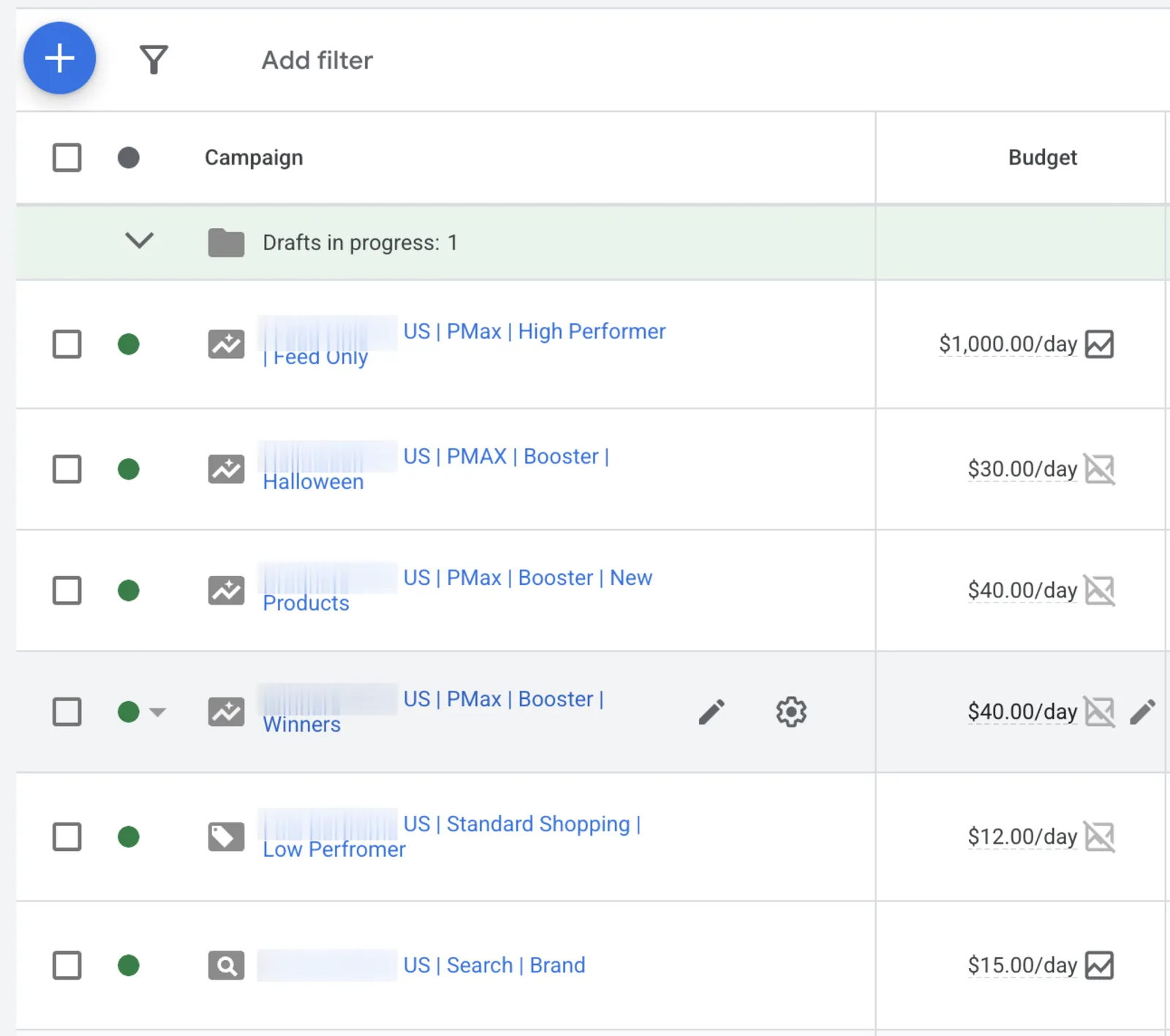
Run Performance Max as the engine, with a small Search campaign underneath it, and add Standard Shopping once you know which products earn. Performance Max reaches every Google surface from one product feed. Search catches the exact buying phrases while Performance Max is still learning. Standard Shopping gives you manual control on your best margin products later. Demand Gen only makes sense for a product nobody is searching for yet.

Most beginners launch four campaign types on day one because a video told them to. Then the budget splits five ways, no campaign gets enough conversions to learn, and the whole account sits in limbo for a month. Start narrow.

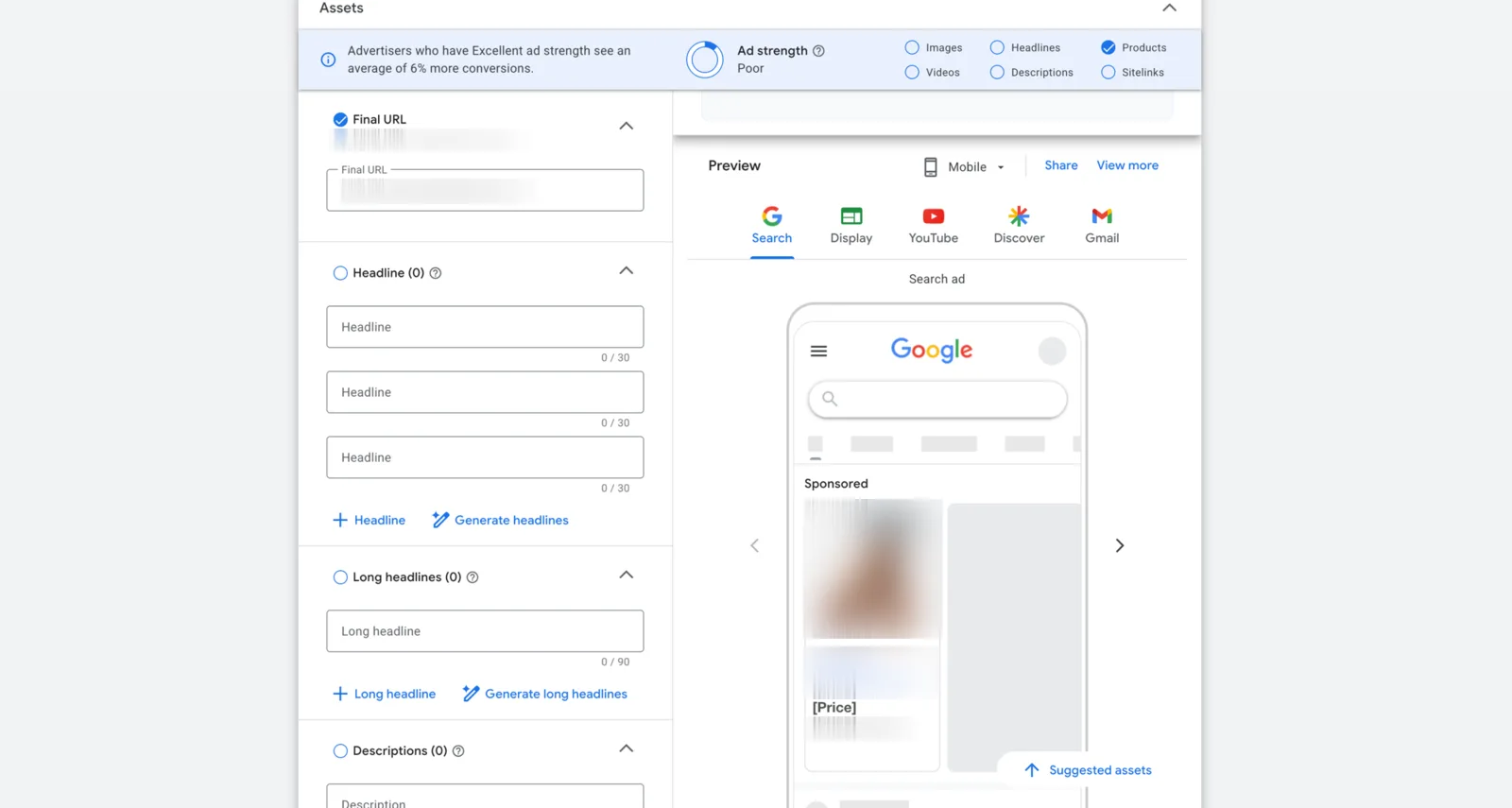
Run Performance Max in feed-only mode at the start. That means no headlines, no images, no video assets - just the product feed. It keeps the campaign on Shopping-style placements where buying intent lives, instead of spraying your budget across YouTube and Display before you have any data. We run feed-only PMax on the large majority of dropshipping accounts.

One structural point that pays for itself: do not put your whole catalog into one asset group. When we looked at 12,304 Performance Max campaigns across our accounts, two asset groups split by margin tier beat one asset group by 17 percent ROAS at the same spend. Five did worse than two. Two is the sweet spot. Your best margin products go in one group, everything else goes in the second with a tighter target.

The small Search campaign does two jobs. It prints while Performance Max is still figuring things out, and it protects your own brand name, which is the cheapest traffic you will ever buy.

Campaign typeWhere it showsNeeds a feed?Best use for dropshippingThe trap
Performance MaxSearch, Shopping, YouTube, Display, Gmail, MapsYesYour main engine. One campaign, feed only, two asset groups split by margin tier.One asset group holding the whole catalog. Google feeds the easy products and starves the profitable ones.
Standard ShoppingSearch results and the Shopping tabYesManual control on your best margin products once you know what those are.Running it across the whole catalog. It just becomes a slower copy of Performance Max.
SearchText ads on Google resultsNoA tight backstop on exact product phrases and your own brand name.Broad match with no negative list. It burns budget on people who wanted a tutorial.
Demand GenYouTube, Discover, GmailOptionalNew products with no search demand yet, once you already have a winner funding it.Running it early. You are paying to create demand you cannot afford to create.
Campaign types, ranked by how useful they are on a dropshipping store.

One feed-only Performance Max campaign plus one small Search campaign is a complete starting account. Add anything else only when you can name the job it does.

Go deeper: Performance Max for dropshipping, in full >

Lesson 3

Set up Merchant Center on Shopify Without Getting Suspended

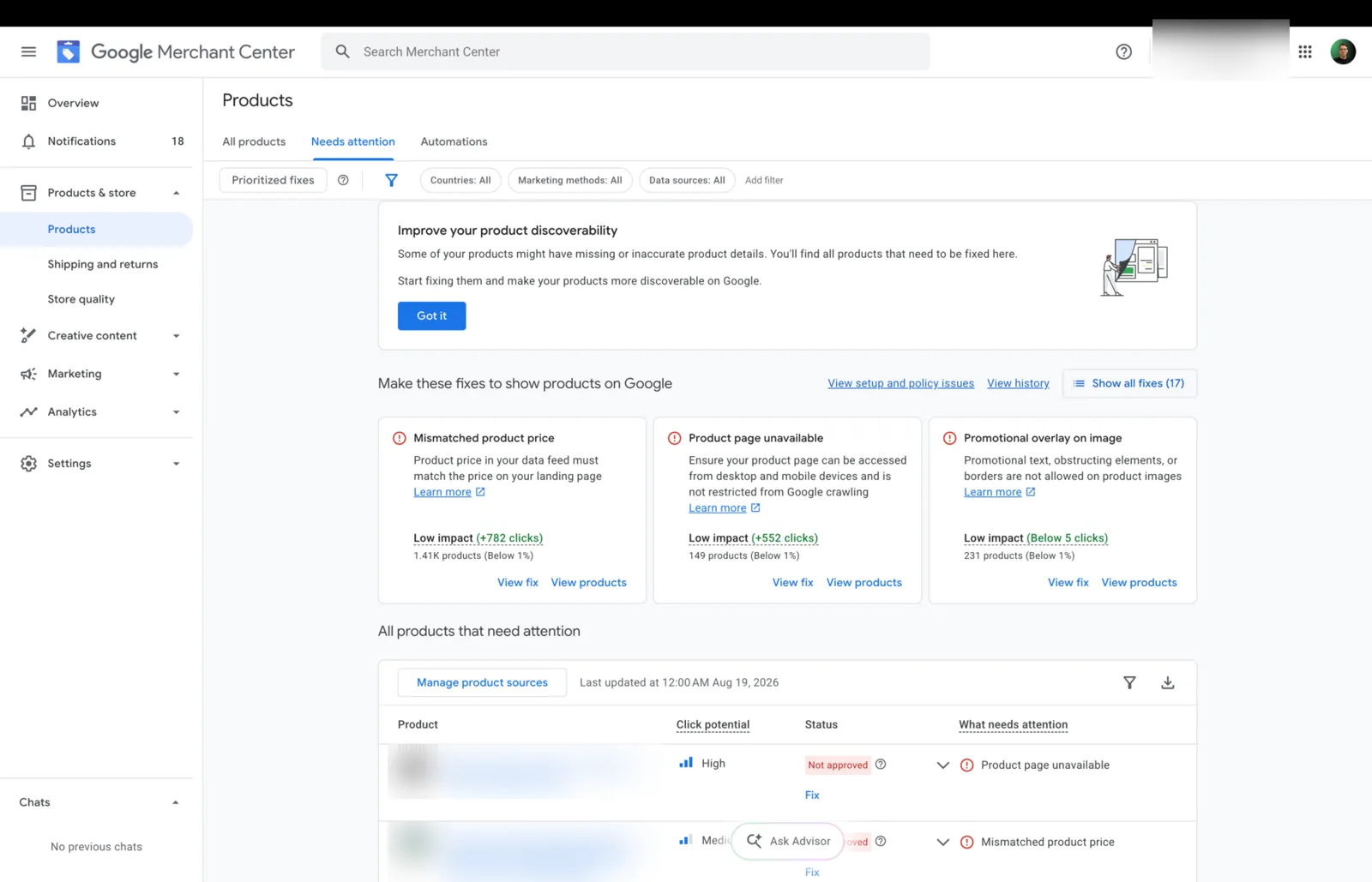
Merchant Center is where your products live before any Shopping or Performance Max ad can run. On a new dropshipping store the order matters more than the settings. Ship the five policy pages first. Verify your domain. Make shipping and returns match reality exactly. Then upload products in small daily batches instead of dumping the whole catalog on day one. That last habit is the slow drip, and it cuts misrepresentation suspensions on new dropshipping stores by roughly 70 percent across our accounts.

Google flags new dropshipping stores for three signals stacked together: a young domain, a large catalog uploaded at once, and generic product pages. A brand-new store usually hits all three on day one, which is why so many people get suspended before their first sale.

You cannot fix the young domain. You can absolutely fix the other two, and the drip is the cheapest fix there is. Upload 20 products, wait, upload 30 more, wait. The trust signal builds. By week two you can drop the long tail in one go and Google will not blink.

One Shopify-specific warning: the Google sales channel wants to push your entire catalog the second you connect it. On a new store that is the mistake. Control what goes up and when.

  1. Step 1

    Ship five pages before a single product uploads

    Shipping policy with real country-by-country times. A 30-day returns policy. Privacy policy. Terms of service. A contact page with a real email, phone number and address. Link all five from the footer of every page. Google reviews your policies before it reviews your products, so skipping this makes everything after it pointless.

  2. Step 2

    Claim and verify the domain you actually advertise

    Verify the store domain inside Merchant Center. Shopify can do this in one click from the Google channel. An unverified domain blocks every campaign downstream, and it is the first thing to check when nothing will run.

  3. Step 3

    Make shipping and returns match, to the day

    The delivery times in Merchant Center have to match the times on your store, and both have to match what your supplier really does. Saying five days when the truth is fifteen is the single fastest route to a misrepresentation suspension. Pick honest numbers and put the same numbers everywhere.

  4. Step 4

    Turn off the full auto sync

    The default Shopify connection pushes everything at once. Switch it off and use a controlled feed, or publish products in small batches through the sales channel availability setting instead. You want a tap, not a flood.

  5. Step 5

    Drip in your first 20 products on day three

    Pick 20 clean products: your own photos, your own descriptions, correct prices, real stock. Upload them and then wait a full 24 hours. Watch the diagnostics tab. Zero disapprovals means you are clear to continue.

  6. Step 6

    Scale the drip only while it stays clean

    If day three cleared, push 30 a day for the next four days, then 50 to 75 a day in week two. If anything gets flagged, stop, fix that product, and only then continue. Sensitive categories like beauty tools go slower, around 15 to 25 a day. Home gadgets and pet products clear faster.

  7. Step 7

    Read the diagnostics tab every morning

    New disapprovals show up there days before they show up in your revenue. Fix the cause, not the symptom. A disapproved product is a product not in the auction, and Smart Bidding compounds that loss quietly.

If your catalog is over 1,000 products the drip math stops working, because dripping would take months. That case needs the day-one approval playbook instead.

Go deeper: The full 14-day Merchant Center slow drip cadence >

Lesson 4

Optimize the Product Feed, Because the Feed Is the Campaign

Shopping and Performance Max have no keywords. Google matches searches against your product data instead, which makes the feed your real campaign. Four jobs, in order. Rewrite every title to lead with the words buyers type. Write your own descriptions. Fill in every attribute you can honestly fill. Tag each product with its margin tier so bidding chases profit instead of revenue.

Supplier titles are written for suppliers, not buyers. Something like 'New Hot Sale Portable Multi-Functional Pet Grooming Kit Dropship' matches almost nothing a real person types into Google. Your buyer types 'dog grooming brush for shedding'. If those words are not in your title, you are not in that auction at all.

The title formula that works: brand, then product type, then the words buyers use, then the key attribute like size, colour or material. Keep the important part inside the first 70 characters, because that is roughly what shows before Google cuts it off. Write for the search first and your brand second.

Descriptions matter more than they used to. Copying the supplier text is both a duplicate-content problem and a misrepresentation risk, since fifty other stores have the same paragraph. Write your own and describe what the thing actually does. Google wants at least 100 characters and allows up to 5,000, so you have room. AI shopping surfaces read those descriptions too.

Never invent a GTIN. If your supplier did not give you one, leave it blank and set the identifier flag correctly. A made-up product code is a fast suspension and it is not worth the ten minutes it saves.

Last piece: custom labels. Google cannot see your margins. If you do not tell it which products earn, Smart Bidding will happily scale the ones that sell the most units, which on a dropshipping catalog are often the thin ones. Sort your products into margin tiers, write that tier into a custom label, and split your asset groups on it.

And if you think everyone already does this work, we measured it. Across 12,375 products in 251 real Merchant Center accounts (our Product Feed Quality Index, July 2026): 81.3% of products carry neither a GTIN nor an MPN, 68% of titles run past 80 characters while Google shows about 70, and only 5% of products name a material or pattern. The automatic fields are filled everywhere. The manual ones are empty everywhere. That is your opening.

AttributeWhy it decides the auctionThe rule
titleThe main thing Google matches searches againstLead with the search words. Keep the important part in the first 70 characters.
descriptionSecondary matching, and it feeds AI shopping surfacesWrite your own. Google wants 100 characters minimum and allows up to 5,000. Never paste supplier text.
google_product_categoryDecides which auction you compete in at allUse the numeric category ID, and pick the deepest one that is honestly true.
product_typeYour own category path, used to split campaignsYour structure, your rules. Do not let a feed tool overwrite it.
gtin / identifier_existsTrust signal and price comparisonUse the real code or none at all. Never invent one.
image_linkDrives click-through, and it is a common disapproval reasonYour own photo wherever you can. Most categories want a plain background.
price / sale_priceMust match the landing page to the centAny mismatch is an instant disapproval. Check it after every price change.
availabilityStops you paying for clicks on things you cannot shipSync it daily. Supplier stock moves without telling you.
color / size / materialUnlocks the long-tail searches you are invisible forFill them from real product data, and only where you are sure.
custom_label_0The only way to bid differently by marginWrite the margin tier here, then split asset groups on it.
The feed attributes that decide who wins the Shopping auction.

Spend your first week on titles and attributes, not on bids. It is the highest-return work on a dropshipping account and it keeps paying for months.

Go deeper: Google Shopping ads for dropshipping, feed and structure >

Lesson 5

Negative Keywords, Where Dropshipping Budget Leaks

A negative keyword tells Google never to show your ad on a search. On a dropshipping store the leak is nearly always the same three groups. People hunting for something free. People who want to make it themselves. People shopping for a brand you do not sell. Build a starter list before you launch, apply it at account level so Performance Max obeys it too, then add to it from the search terms report every week.

Negatives come in the same three match types as normal keywords. Negative broad blocks any search containing all your words in any order. Negative phrase blocks the words in that order. Negative exact blocks only that search. One catch that trips everyone up: negative keywords do not match close variants, so plurals, misspellings and different word orders each need their own entry.

Put the list at account level, not campaign level. Performance Max accepts an account-level negative keyword list, and that is the only clean way to keep it out of the searches you never want. Campaign-level negatives leave PMax free to wander.

Then run the weekly loop. Open the search terms report, sort by cost, and look at anything that spent money without producing a sale. If a term does that two weeks running, it becomes a negative. Fifteen minutes a week, and it is the cheapest ROAS improvement in the whole account.

One warning. Do not blanket-block words that might be how your buyer actually shops. If you sell the budget version of something, 'cheap' is your customer, not your enemy. Read the terms before you block them.

  • Free and make-it-yourself

    free, freebie, how to make, homemade, diy, pattern, template, tutorial. These people are not buying anything today.

  • Research, not shopping

    what is, meaning, definition, wikipedia, images, pictures, jobs, salary, reddit. Curiosity traffic that clicks and leaves.

  • The wrong kind of buyer

    wholesale, bulk, supplier, manufacturer, distributor, dropshipper, aliexpress, alibaba. These are people trying to become your competitor.

  • Brands you do not stock

    Every competitor brand name you do not sell. Supplier photos often carry brand-adjacent words that pull in the wrong searches.

  • Near-miss products

    The words one step away from what you sell. If you sell dog beds, block cat bed, bed frame, and bedding before they eat a week of budget.

  • Used, spares and repairs

    used, second hand, repair, replacement part, spare, manual, instructions. Cheap clicks that never end in a new-product sale.

Negatives are not a one-time setup. They are a fifteen minute weekly habit, and skipping them is why so many dropshipping accounts look expensive when they are only untidy.

Go deeper: Negative keywords for Google Ads dropshipping, with the full list >

Lesson 6

Conversion Tracking and GA4, the Step Nothing Else Survives Without

Smart Bidding only bids as well as the data you feed it. Set up one purchase conversion action, mark only that one as primary, send the real order value with every conversion, switch on enhanced conversions, and add server-side tracking. Pixel-only setups lose 30 to 40 percent of iPhone Safari conversions, and Google bids as if those sales never happened.

This is the least exciting lesson on the page and the one that breaks the most accounts. When someone tells us their bidding is broken, it turns out to be a tracking problem often enough that we now check tracking first, every time.

The classic dropshipping mistake is double counting. The store has a Google Ads purchase tag AND an imported GA4 purchase, both marked primary. Every sale gets counted twice, ROAS looks amazing, the operator scales, and the real bank account goes the other way. Pick one source of truth for purchases.

The other classic is a fixed conversion value. If every sale reports as 1, Google cannot tell a 20 dollar order from a 200 dollar one, so value-based bidding has nothing to optimise. Send the real transaction value.

  1. Step 1

    Install the tag

    Use the Shopify Google channel or Google Tag Manager. One tag, on every page, checked in preview mode before you trust it.

  2. Step 2

    Create one purchase conversion action

    Count it as one per click, not every. Set the value to the real transaction value, passed dynamically from the order. This single action is what your whole account will be judged on.

  3. Step 3

    Mark only the purchase as primary

    Add to cart, begin checkout and page views all belong in secondary. Two primary purchase actions means every ROAS number in the account is wrong.

  4. Step 4

    Link GA4 and Google Ads, then pick one purchase source

    Linking is useful for audiences and reporting. Just never let both the GA4 purchase import and the Google Ads tag purchase sit as primary at the same time.

  5. Step 5

    Turn on enhanced conversions

    It sends a hashed, privacy-safe version of the customer email with the conversion so Google can match sales it would otherwise lose. Free, and it recovers real data.

  6. Step 6

    Add server-side tracking

    Order data goes from your Shopify back end straight to Google, so it survives ad blockers, Safari privacy rules and the next iOS update. This is what closes most of that 30 to 40 percent gap.

  7. Step 7

    Reconcile it weekly

    Compare Google Ads conversions against real Shopify orders from Google traffic. A gap of 10 to 30 percent is what we see on accounts that come to us, and it is almost always tracking rather than anything sinister. Close the gap before you touch a single bid.

Check the data before you blame the algorithm. A campaign optimising against half your sales is a measurement problem wearing a bidding costume.

Go deeper: Google Ads conversion tracking for dropshipping, set up properly >

Lesson 7

The Only Math You Need: Break-Even ROAS and Max Cost per Sale

Three numbers tell you whether a dropshipping campaign is working. Break-even ROAS is 1 divided by your net margin. Max cost per sale is the profit you keep before ad spend. Max cost per click is your max cost per sale multiplied by your conversion rate. Work those out before you launch and you will never again wonder whether a 3x ROAS is good.

Every 'is this a good ROAS' question is really a 'what is my margin' question. On a 40 percent margin, break-even is 2.5, so a 3x is profit. On a 25 percent margin, break-even is 4.0, and that same 3x loses money on every single order while looking like a win in the dashboard.

The numbers in the table below are invented to show the method. They are not our data and they are not anyone's results. Put your own numbers in the same slots.

The mistake almost everyone makes is using gross margin instead of net. Gross margin ignores payment processing, refunds, chargebacks, app subscriptions and the shipping you eat when something goes wrong. Your real break-even is always higher than the first number you calculate. Be pessimistic here and the account will surprise you in the right direction.

One nuance on targets. Set your target ROAS above break-even, but do not set a punishing target on day one. A tight target with no conversion data starves the campaign. It never collects enough data to learn. Then you conclude the product does not work, when really the target never let it try.

StepFormulaExample store
What you keep per saleSell price minus product cost minus fees50 minus 25 minus 5 = 20
Net marginWhat you keep divided by sell price20 / 50 = 40%
Break-even ROAS1 divided by net margin1 / 0.40 = 2.5
Max cost per sale at break-evenThe same as what you keep per sale20
Max cost per sale if you want 8 profitWhat you keep minus the profit you want20 minus 8 = 12
Target ROAS for that profitSell price divided by max cost per sale50 / 12 = about 4.2
Max cost per clickMax cost per sale times conversion rate12 x 0.02 = 0.24
A worked example with invented numbers. Swap in your own and the method holds.

Write your break-even ROAS on a sticky note before you launch. Every decision after that is just comparing a number to it.

Go deeper: ROAS vs POAS: bidding on real profit >

Lesson 8

The Staged Build: Launch Small, Read It, Then Scale

Do not launch big. Start with one feed-only Performance Max campaign at around 50 dollars a day plus a small Search campaign, and do not touch anything for 14 days. Then read the results against your own break-even ROAS. Scale in 20 to 30 percent steps with a full week of stability between each one. Hire help when your time, not your budget, has become the limit.

The 50 dollars a day floor is arithmetic, not a preference. Smart Bidding needs roughly 30 conversions per campaign before it can tune properly. Spend much less than 50 a day on a typical dropshipping price point and you never reach 30 conversions inside a window Google still counts as current. The campaign then sits in learning forever.

The 14-day rule is the hardest one to follow. The first two weeks look slow on paper, and every instinct says to intervene. Changing budgets, targets or structure during that window resets the learning and you start the clock again. Write down what you are worried about, wait, then decide with data.

Scaling is a staircase, not a ramp. Raise the budget 20 to 30 percent, hold a week, check the ROAS held, raise again. Doubling the budget in a day is the most reliable way to blow up an account that was working fine yesterday.

StageHow longWhat you runWhat you watchWhat not to do
Stage 0: foundationsWeek 0Policy pages live, Merchant Center verified, tracking tested with a real test orderA clean Merchant Center and conversions that match ShopifyDo not run a single ad yet
Stage 1: cold launchDays 1 to 14One feed-only Performance Max at around 50 a day, plus a small Search campaign on brand and top product phrasesImpressions, clicks, and whether conversions start landing at allDo not change bids, budgets, targets or structure
Stage 2: read itDays 15 to 45Same campaigns. Split Performance Max into two asset groups by margin tier. Add negatives weeklyYour break-even ROAS, cost per sale, and which products actually sellDo not scale a campaign sitting under 30 conversions
Stage 3: scaleDay 45 onwardRaise budget 20 to 30 percent, hold a week, repeat. Add Standard Shopping on your best margin productsWhether ROAS holds after each step, and whether margin holds with itDo not double the budget in a day
Stage 4: get helpOnce it worksA senior operator runs the daily feed, Merchant Center and scaling workWhether the fee costs less than the mistakes plus your hoursDo not hire someone to rescue a store with no product and no margin
The five stages, and the one thing not to do in each.

Under about 5,000 a month in ad spend, learn it yourself. The free community is built for exactly that. Past it, when one mistake costs more than a month of management, done-for-you starts paying for itself.

Go deeper: How to start dropshipping with Google Ads, step by step >

Lesson 9

Five Mistakes That Kill Dropshipping Accounts

Across 200+ live ecom accounts the same five mistakes come up again and again, and not one of them is the bidding strategy. Dumping the whole catalog into Merchant Center on day one. One Performance Max with everything in a single asset group. Judging results before 30 conversions. Bidding on revenue instead of margin. And tracking that only sees half the sales.

  • 1. Dumping the whole catalog in on day one

    A week-old domain, 800 products uploaded at once and supplier photos reads to Google as misrepresentation. Drip the catalog in instead, 20 products on day three and up from there. It is the difference between a store that runs and a store that appeals.

  • 2. One Performance Max, one asset group, everything inside it

    Google feeds whatever converts easiest and starves the products that actually make you money. Two asset groups split by margin tier beat one by 17 percent ROAS across 12,304 campaigns in our accounts. Five did worse than two, so do not overdo it either.

  • 3. Judging the account before 30 conversions

    Under 30 conversions you are reading noise and calling it a trend. You change the target, learning resets, and now you will never get a clean read. Set the campaign up properly, then leave it alone for the full 14 days.

  • 4. Bidding on revenue instead of margin

    Smart Bidding cannot see your margins unless you tell it. Without margin labels it will scale your highest-volume products, which on a dropshipping catalog are usually the thinnest. Revenue goes up, profit goes down, and the dashboard looks great the whole time.

  • 5. Pixel-only tracking

    You lose 30 to 40 percent of iPhone Safari conversions, so Google optimises as if a third of your sales never happened. Your cost per sale looks worse than it really is and the algorithm makes decisions on a lie. Server-side tracking fixes it.

Every one of these is a setup problem, not a skill problem. That is good news: setup problems are fixable in an afternoon.

Go deeper: Why Google Ads dropshipping accounts fail >

Lesson 10

Google Ads or Meta for Dropshipping?

Google Ads is usually the better first channel for dropshipping, because the traffic already wants the product. Someone types the product name and you show them the product. Meta interrupts someone who was not shopping, so you have to create the desire with creative before you can sell anything. Meta wins when you are selling something nobody is searching for yet.

The deeper difference is what kind of work each one rewards. Google is feed work, structure work and tracking work. Do it once properly and it keeps earning for months. Meta is creative work: test hooks, find a winner, scale it until it dies, then find the next one. Neither is easier. They are different jobs.

Buying intent also changes what margin you can survive on. On Google the person already decided they want the thing, so the conversion rate is higher and thinner margins still work. On Meta you are funding the discovery, which usually needs a fatter margin to pay for the testing.

Be honest about the exception. If your product went viral on TikTok and has no search volume behind it, Google has nowhere to show you. Start on Meta, build the demand, and move to Google once people are actually typing the product name.

One disclosure so you can weigh this properly: we run Google Ads, not Meta. Read this as an operator's view of two different jobs rather than a neutral referee call.

Google AdsMeta Ads
How people find youThey search for the productThey scroll and you interrupt them
The main workFeed, Merchant Center, tracking, structureCreative testing, hooks, angles
How it compoundsFix the feed once and it keeps earningEvery winning creative dies and you test again
Ramp speedSlower first two weeks, steadier afterFaster spikes, faster crashes
What breaks itA broken feed or a Merchant Center suspensionCreative fatigue and rising CPMs
Margin neededWorks on thinner margins because intent is higherUsually needs a fatter margin to fund testing
Best forProducts people already search forProducts nobody knows exist yet
The honest side-by-side for a dropshipping store.

If people are searching for what you sell, start on Google. If they are not, create the demand on Meta first and come back.

Go deeper: Google Ads vs Facebook Ads for dropshipping, in full >

Watch and learn

Watch the walkthroughs.

The dropshipping learn path, on camera. Full account breakdowns and setups from @ecomchrisx.

Ecom Chris channel avatar
Ecom Chris

@ecomchrisx · 3.77K subscribers

Subscribe
New9:23

How I'd Learn Google Ads in 2026 (If I Started From Zero)

230 views2mo ago

12:30

What the Top 1% of Google Ads Dropshippers Do Differently in 2026

177 views2mo ago

Free playbooks

Read the same playbooks our operators run.

These are the real SOPs behind the lessons above. Free to read, open in a new tab, no email needed.

Reading alone is the slow way. Run the six steps with 1,200+ operators and monthly live calls - free forever.

Straight from the feed

Proof the Free Playbook Works

Real posts from the Wins & Results feed inside the lab - names, numbers, and comments exactly as members shared them. This is what 1,200+ operators in one room looks like.

Skool post by Saar Willering: 345k in one month with 25% COGS, new store in a multi feed market, profit-first
Skool post by Yafet Habtemicael: from zero in March to 14.1K pounds revenue and 240 orders in the last 30 days
Skool post by Saar Willering: 6.3k day in just two months, fashion niche, UK and Ireland
Skool post by Omar Travolta: first sale of 760.20 dollars after 174 dollars of spend, with a thank-you to the group

Screenshots captured from the community on July 18, 2026. Results are individual members' own reports, not promises.

Learn in public

Keep learning where the lessons drop daily.

The community is where you ask. The socials are where the lessons land first: real account breakdowns, wins, and what changed this week in Google Ads.

Google Ads Dropshipping FAQ

Questions People Ask Before They Start Learning

What Is Google Dropshipping?

Google dropshipping is running a dropshipping store on Google instead of on social feeds. You list your products in Google Merchant Center, then Shopping, Performance Max and Search ads put those products in front of people who are already searching for them. Your supplier ships the order. The work sits in the product data and the tracking, not in ad creative, which is the main thing that makes it different from selling on Meta or TikTok.

Is Google Ads Good for Dropshipping?

Yes, if you respect the floor. Google Ads runs on buying intent, so you skip the endless creative-testing grind that Meta demands, and the same feed work keeps earning for months. The catch is that Smart Bidding needs roughly 30 conversions per campaign before it can tune, which in practice means about 50 dollars a day per store for two weeks. Below that the account stays stuck in learning and you never get a clean read.

How Do I Use Google Ads for Dropshipping?

In this order. Ship your policy pages, verify your domain in Merchant Center, and match your shipping and returns to what the supplier really does. Upload your first 20 products, then drip more in daily. Rewrite your product titles around what buyers type. Set up one purchase conversion action with real order values. Work out your break-even ROAS. Then launch one feed-only Performance Max campaign at around 50 dollars a day plus a small Search campaign, and leave it alone for 14 days. The ten lessons on this page walk through each of those.

Can I Learn Google Ads for Dropshipping for Free?

Yes. This page is the full guide and there is no email gate on it. The Google Ads eCom Lab community is free forever too: the structured course is inside, live calls run monthly, and real operators answer questions in chat. Paid courses run $97-$497 a month and teach one creator's playbook. The Lab teaches the playbook that runs on 200+ live accounts.

How Long Does It Take to Learn Google Ads for Dropshipping?

Your first campaign can be live within a week. Reading results properly takes about 30 days, because Smart Bidding needs conversions before the numbers mean anything. Running an account independently takes around 90 days of reps. Anyone promising mastery in a weekend is selling you something.

What Is a Good ROAS for Dropshipping?

Any number above your break-even, and break-even is 1 divided by your net margin. If you keep 40 percent of each sale after product cost and fees, your break-even ROAS is 2.5, so a 3x is a win. If you only keep 25 percent, break-even is 4.0 and that same 3x quietly loses money on every order. There is no universal good ROAS, which is why lesson 7 on this page makes you calculate your own before you judge a single campaign.

How Much Money Do I Need to Start Google Ads Dropshipping?

Plan for about 50 dollars a day for the first two weeks, so roughly 700 dollars of ad budget before you have enough data to judge anything. That is the practical floor for Smart Bidding to collect the conversions it needs. On top of that you need enough cash to actually fulfil the orders that come in, because your supplier gets paid before your payout lands. Starting on 10 dollars a day is how most people conclude that Google Ads does not work.

Do I Need Merchant Center to Run Google Ads for Dropshipping?

Yes, for anything that shows a product image. Shopping campaigns and Performance Max both pull from a Merchant Center product feed, so no approved feed means no ads. Plain text Search ads can run without it, but on a dropshipping store they are a backstop, not the engine. Set up Merchant Center first and drip your products in, which is lesson 3 on this page.

Why Did My Dropshipping Store Get Suspended?

Almost always misrepresentation, and almost always the store, not the ads. Five causes cover nearly every case. Supplier photos that fifty other stores also use. Descriptions copied word for word from the supplier. Shipping times that say five days when the truth is fifteen. No working contact page. Prices in the feed that disagree with the site. Fix the store for real, then appeal once, properly. Do not buy an aged account to skip the fix. That is circumvention, and it is a worse violation than the one that got you suspended.

Google Ads or Facebook Ads for Dropshipping?

Google first if people already search for your product, because you are answering demand instead of creating it. Meta first if you are selling something nobody knows exists yet, like a gadget that just went viral on TikTok with no search volume behind it. The work is different too: Google is feed and structure work that compounds, Meta is creative testing that resets every time a winner dies. Lesson 10 on this page has the full side-by-side.

Do I Need a Paid Course to Learn Google Ads Dropshipping?

No. Everything a paid course covers is on this page, in the free Google Ads eCom Lab course, and in the deep-dive posts linked below. What a course cannot give you is feedback on your real account. The Lab gives you that in chat and on the monthly live calls, for free.

What Should I Learn First: Campaigns or the Feed?

The feed and tracking, always. Campaigns bid on what the feed and the conversion data tell them. Learn Merchant Center, product data, and tracking first, then campaign structure, then bidding. Most beginners run that order backwards and blame the platform.

Where Can I Ask Questions While I Learn?

Inside the Google Ads eCom Lab. Post your question in chat and operators answer, or bring the account to a monthly live call. New lessons and breakdowns also drop Monday to Saturday inside, and long-form tutorials land on YouTube at @ecomchrisx.

When Should I Stop DIY and Get Help?

When the account makes money and your time becomes the bottleneck. Learning is the right move at the start: you will understand every report an agency ever shows you. Once you are scaling and each mistake costs more than a management fee, done-for-you starts paying for itself. That path is on our Google Ads dropshipping page.

Learn It Free. Run It on a Real Store

Join the free Google Ads eCom Lab: the structured course, monthly live calls, 1,200+ operators, and the wins wall to prove the playbook works. No card, no trial, free forever.

We work with brands serious about scale. If that is you, let's talk.

Join the Google Ads eCom Lab
Arthur, 8-Figure Fashion Dropshipper, ZenoX Media clientMatt, Canadian E-Com Legend, ZenoX Media clientMark, 7-figure brand owner in the travel niche, ZenoX Media client
1,200+ operators learning inside. Free forever.

Rather have it done for you? See how we run Google Ads for dropshipping stores

While you learn

Questions Every New Dropshipper Asks

These come up on every call and in the community every week. Each one answered in full, with the numbers, and nothing sold.